check_logfiles

Posted on July 12th, 2009 by lausser

Description

check_logfiles is a Plugin for Nagios which scans log files for specific patterns.

Motivation

The conventional plugins which scan log files are not adequate in a mission critical environment. Especially the missing ability to handle logfile rotation and inclusion of the rotated archives in the scan allow gaps in the monitoring. Check_logfiles was written because these deficiencies would have prevented Nagios from replacing a propritetary monitoring system.

Features

  • Detection of rotations – usually nightly logfiles are rotated and compressed. Each operating system or company has it’s own naming scheme. If this rotation is done between two runs of check_logfiles also the rotated archive has to be scanned to avoid gaps. The most common rotation schemes are predefined but you can describe any strategy (shortly: where and under which name is a logfile archived).
  • More than one pattern can be defined which again can be classified as warning patterns and critical patterns.
  • Triggered actions – Usually nagios plugins return just an exit code and a line of text, describing the result of the check. Sometimes, however, you want to run some code during the scan every time you got a hit. Check_logfiles lets you call scripts either after every hit or at the beginning or the end of it’s runtime.
  • Exceptions – If a pattern matches, the matched line could be a very special case which should not be counted as an error. You can define exception patterns which are more specific versions of your critical/warning patterns. Such a match would then cancel an alert.
  • Thresholds – You can define the number of matching lines which are necessary to activate an alert.
  • Protocol – The matching lines can be written to a protocol file the name of which will be included in the plugin’s output.
  • Macros – Pattern definitions and logfile names may contain macros, which are resolved at runtime.
  • Performance data – The number of lines scanned and the number of warnings/criticals is output.
  • Windows – The plugin works with Unix as well as with Windows (e.g. with ActiveState Perl).

Introduction

Usually you call the plugin with the –config option which gets the name of a configuration file:

nagios$ check_logfiles --config <configfile>
OK - no errors or warnings

In it’s most simple form check_logfiles can get all the essential parameters as command line options. However, not all features can be utilized in this case.

nagios$ check_logfiles --tag=ssh --logfile=/var/adm/messages
     --rotation=SOLARIS
     --criticalpattern="Failed password for root"
OK - no errors or warnings |ssh=1722;0;0;0
nagios$ check_logfiles --tag=ssh --logfile=/var/adm/messages
     --rotation=SOLARIS
     --criticalpattern="Failed password for root"
CRITICAL - (1 errors in check_logfiles.protocol-2007-04-25-20-59-20)
     - Apr 25 20:59:15 srvweb8 sshd[10849]:
[ID 800047 auth.info] Failed password for root
     from 172.16.224.11 port 24206 ssh2 |ssh=2831;0;1;0

In principle check_logfiles scans a log file until the end-of-file is reached. The offset will then be saved in a so-called seekfile. The next time check_logfiles runs, this offset will be used as the starting position inside the log file. In the event that a rotation has occurred in the meantime, the rest of the rotated archive will be scanned also.

Documentation

For the most simple applications it is sufficient to call check_logfile with command line parameters. More complex scan jobs can be described with a config file.

Command line options

  • –tag=<identifier> A short unique descriptor for this search. It will appear in the output of the plugin and is used to separare the different services.
  • –logfile=<filenname> This is the name of the log file you want to scan.
  • –rotation=<method> This is the method how log files are rotated.
  • –criticalpattern=<regexp> A regular expression which will trigger a critical error.
  • –warningpattern=<regexp> The same…a match results in a warning.
  • –criticalexception=<regexp> / –warningexception=<regexp> Exceptions which are not counted as errors.
  • –okpattern=<regexp> A pattern which resets the error counters.
  • –noprotocol Normally all the matched lines are written into a protocol file with this file’s name appearing in the plugin’s output. This option switches this off.
  • –syslogserver With this option you limit the pattern matching to lines originating from the host check_logfiles is running on.
  • –syslogclient=<clientname> With this option you limit the pattern matching to lines originating from the host named in this option.
  • –sticky[=<lifetime>] Errors are propagated through successive runs.
  • –config The name of a configuration file. The syntax of this file is described in the next section.
  • –configdir The name of a configuration directory. Configfiles ending in .cfg or .conf are (recursively) imported.
  • –searches=<tag1,tag2,…> A list of tags of those searches which are to be run. Using this parameter, not all searches listed in the config file are run, but only those selected. (–selectedsearches is also possible)
  • –report=[short|long|html]This option turns on multiline output (Default: off). The setting html generates a table which display the last hits in the service details view.
  • –maxlength=[length] With this parameter long lines are truncated (Default: off). Some programs (e.g. TrueScan) generate entries in the eventlog of such a length, that the output of the plugin becomes longer than 1024 characters. NSClient++ discards these.
  • –winwarncrit With this parameter messages in the eventlog are classified by the type WARNING/ERROR (Default: off). Replaces or complements warning/criticalpattern.

Format of the configuration file

The definitions in this file are written with Perl-syntax. There is a distinction between global variables which influence check_logfiles as a whole and variables which are related to the single searches. A “search” combines where to search, what to search for, which weight a hit has, which action will be triggered in case of a hit, and so on…

$seekfilesdir A directory where files with status information will be saved after a run of check_logfiles. This status information helps check_logfiles to remember up to which position the log file has been scanned during the last run. This way only newly written lines of log files will be read. The default is /tmp or the directory which has been specified with the –with-seekfiles-dir of ./configure.
$protocolsdir A directory where check_logfiles writes protocol files with the matched lines. The default is /tmp or the directory which has been specified with the –with-protocol-dir of ./configure.
$protocolretention The lifetime of protocol files in days. After these days the files are deleted automatically The default is 7 days.
$scriptpath A list of directories where the triggered scripts can be found.(Separated by : under Unix and ; under Windows) The default is /bin:/usr/bin:/sbin:/usr/sbin or the directories which has been specified with the –with-trusted-path of ./configure.
$MACROS A hash with user-defined macro definitions. see below.
$prescript An external script which will be executed during the startup of check_logfiles. The macro $CL_TAG gets the value “startup”. $prescriptparams, $prescriptstdin and $prescriptdelay may be used like scriptparams, scriptstdin and scriptdelay.  
$postscript An external script which will be executed before the termination of check_logfiles. The macro $CL_TAG$ gets the value “summary”. $postscriptparams, $postscriptstdin and $postscriptdelay may be used like scriptparams, scriptstdin and scriptdelay.  
$options A list of options which control the influence of pre- and postscript. Known options are smartpostscript, supersmartpostscript, smartprescript and supersmartprescript. With the option report=”short|long|html” you can customize the plugin’s output. With report=long/html, the plugin’s output can possibly become very long. By default it will be truncated to 4096 characters (The amount of data an unpatched Nagios is able to process). The option maxlength can be used to raise this limit, e.g. maxlength=8192.  
@searches An array whose elements (hash references) describe the actual work of check_logfiles. The keys for these hash references can be found in the next table.  

The single searches are further specified by the following parameters:

tag A unique identifier.
logfile The name of the log file to scan.
archivedir The name of the directory where archives will be moved to after a log file rotation. The default is the directory where the logfile resides.
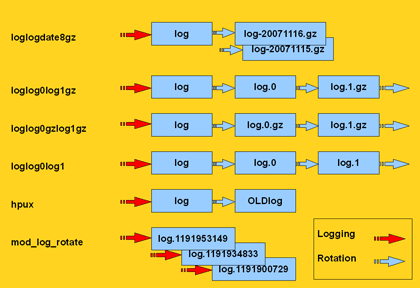
rotation One of the predefined methods or a regular expression, which helps identify the rotated archives. If this key is missing, check_logfiles assumes that the log file will be simply overwritten instead of rotated.
type One of “rotating” (default if rotation was given), “simple” (default if no rotation was given), “virtual” (for files which will strictly be scanned from the beginning), “errpt” (if instead of a logfile the output of the AIX errpt command should be scanned), “ipmitool” (if the IPMI System Event Log should be scanned), “oraclealertlog” (if the alertlog of an Oracle database should be scanned through a database connection) or “eventlog” if the windows Eventlog should be scanned.
criticalpatterns A regular expression or a reference to an array of such expressions. If one of these expressions matches a line in the logfile, this is considered a critical error. If the expression begins with a “!”, then the meaning is reversed. It counts as a critical error if no match for this pattern is found.
criticalexceptions One or more regular expressions which invalidate a preceding match of criticalpatterns.
warningpatterns Corrensponds to criticalpatterns, except a warning instead of a critical error is created.
warningexceptions see above
okpatterns A regular expression or a reference to an array of such expressions. If one of these expressions matches a line in the logfile, all previous found warnings and criticals are discarded.
script If a pattern matches, this script will be executed. It must reside under one of the directories specified in $scriptpath. The script gets plenty of information about the hit via environment variables.
scriptparams Yo can provide command line parameters for the script here. They may contain macros. If $script is a code reference, $scriptparams must be a pointer to an array.
scriptstdin If the script expects input through stdin, you can describe it here. The string may also contain macros.
scriptdelay After the script has finished, check_logfiles may sleep for <delay> seconds before continuing it’s work.
options This is a string with a comma-separated list of options which let you fine-tune the search. Each option can be switched off be preceeding it’s name with “no”. The options in detail are explained in the next table:
template Instead of a tag , a search can also be identified by a template name. If you call check_logfiles with the –tag option, the according search will be run as if it was defined with a tagname. See examples.

Options

[no]script Controls whether a script can be executed. default: off
[no]smartscript Controls whether exitcode and output of the script shall be treated like an additional match. default: off
[no]supersmartscript Controls whether exitcode and output of the script should replace the triggering match. default: off
[no]protocol Controls whether the matching lines are written to a protocol file for later investigation. default: on
[no]count Controls whether hits are counted and decide over the final exit code. If not you can use check_logfiles also just to execute the triggered scripts. default: on
[no]syslogserver If set, only lines originating from the local host are taken into account. This is important if check_logfiles runs on a syslog server where many other hosts report their events to. default: off
[no]syslogclient=string A prefilter. Only lines matching the string are further examined.  
[no]perfdata Controls whether performance data should be added to the output. default: on
[no]logfilenocry Controls how to react, if the log file does not exist. By default this is a reason for an UNKNOWN error. If nologfilenocry is set, the missing log file will be acquiesced. default: on
[no]case Controls whether regular expressions are case-sensitive default: on
[no]sticky[=seconds] Controls whether an error is propagated through successive runs of check_logfiles. Once an error was found, the exitcode will be non-zero until an okpattern resets it or until the error expires after <second> seconds. Do not use this option until you know exactly what you do. default: off
[no]savethresholdcount Controls whether the hit counter will be saved between the runs. If yes, hit numbers are added until a threshold is reached (criticalthreshold). Otherwise the run begins with resetted counters. default: on
[no]encoding=string The logfile is encoded in Unicode. (e.g. ucs-2) default: off
[no]maxlength=number Truncates very long lines at the <number>-th character default: off
[no]winwarncrit Can be used instead of patterns to find all events of type WARNING/ERROR in the Windows-Eventlog default: off
[no]criticalthreshold=number A number which denotes how many lines have to match a pattern until they are considered a critical error. default: off
[no]warningthreshold=number A number which denotes how many lines have to match a pattern until they are considered a warning. default: off
[no]allyoucaneat With this option check_logfiles scans the entire logfile during the initial run (when no seekfile exists) default: off
[no]eventlogformat This option allows you to rewrite the message text of a Windows event. Normally it only consists of the field Message. You can enrich this string with additional information (EventID, Source,….)
Scroll down for details.
default: off
[no]preferredlevel If warningpattern and criticalpattern were chosen in a way that a specific line matches both of them (so the output looks like “1 error, 1 warning”), you can use this option to count only one of them. (e.g. with preferredlevel=critical the output would be “1 error”). default: off
[no]randominode This is used for a very special case, where the inode of the logfile is constantly changing. (for example because with every appended line the logfile is written entirely new) default: off

Predefined macros

$CL_USERNAME The name of the user executing check_logfiles
$CL_HOSTNAME$ The hostname without domain
$CL_DOMAIN$ The DNS-domain
$CL_FQDN$ Both together
$CL_IPADDRESS$ The IP-adress
$CL_DATE_YYYY$ The current year
$CL_DATE_MM$ The current month (1..12)
$CL_DATE_DD$ The day of the month
$CL_DATE_HH$ The current hour (0..23)
$CL_DATE_MI$ The current minute
$CL_DATE_SS$ The current second
$CL_DATE_CW$ The current calendar week (ISO 8601:1988)
$CL_SERVICEDESC$ The name of the config file without extension.
$CL_NSCA_SERVICEDESC$ the same
$CL_NSCA_HOST_ADDRESS$ The local address 127.0.0.1
$CL_NSCA_PORT$ 5667
$CL_NSCA_TO_SEC$ 10
$CL_NSCA_CONFIG_FILE$ send_nsca.cfg
  The following macros change their value during the runtime.
$CL_TAG$ The tag of the current search
$CL_TEMPLATE$ The name of the template used (if any).
$CL_LOGFILE$ The file to be scanned next
$CL_SERVICEOUTPUT$ The last matched line.
$CL_SERVICESTATEID$ The error level as a number 0..3
$CL_SERVICESTATE$ The error level as a word (OK, WARNING, CRITICAL, UNKNOWN)
$CL_SERVICEPERFDATA$ The Performancedata.
$CL_PROTOCOLFILE$ The file where all matching lines are written.

These macros are also available in scripts called out of check_logfiles. Their values are stored in environment variables, whose names are derived from the macro’s names. The preceding CL_ is replaced by CHECK_LOGFILES_. You can also access user defined macros. Their names are also prefixed with CHECK_LOGFILES_.

nagios$ cat check_logfiles.cfg
$scriptpath = '/usr/bin/my_application/bin:/usr/local/nagios/contrib';
$MACROS = {
    MY_FUNNY_MACRO => 'hihihihohoho',
    MY_VOLUME => 'loud' 
};
 
@searches = (
  {
    tag => 'fun',
    logfile => '/var/adm/messages',
    criticalpatterns => 'a funny pattern',
    script => 'laugh.sh',
    scriptparams => '$MY_VOLUME$',
    options => 'noprotocol,script,perfdata'
  },
);


nagios$ cat /usr/bin/my_application/bin/laugh.sh
#! /bin/sh
if [ -n "$1" ]; then
  VOLUME=$1
fi
printf 'It is %d:%d and my status is %s\n' \
  $CHECK_LOGFILES_DATE_HH \ 
  $CHECK_LOGFILES_DATE_MI \
  $CHECK_LOGFILES_SERVICESTATE
 
printf "I found something funny: %s\n" "$CHECK_LOGFILES_SERVICEOUTPUT"
if [ "X$VOLUME" == "Xloud" ]; then
  echo "$CHECK_LOGFILES_MY_FUNNY_MACRO" | tr 'a-z' 'A-Z'
else
  echo "$CHECK_LOGFILES_MY_FUNNY_MACRO"
fi
printf "Thank you, %s. You made me laugh.\n" "$CHECK_LOGFILES_USERNAME"

Performance data

The number of scanned lines as well as the number of pattern matches (critical, warning and unknown) are appended to the plugin’s output in performance data format. You can suppress this by using the noperfdata option.

nagios$ check_logfiles --logfile=/var/adm/messages
     --criticalpattern="Failed password" --tag=ssh
CRITICAL - (4 errors) - May  9 11:33:12 localhost sshd[29742]
     Failed password for invalid user8 ... |ssh_lines27
     ssh_warnings=0 ssh_criticals=4 ssh_unknowns=0
 
nagios$ check_logfiles --logfile=/var/adm/messages
     --criticalpattern="Failed password" --tag=ssh --noperfdata
CRITICAL - (2 errors) - May  9 11:58:48 localhost sshd[29813]
     Failed password for invalid user8 ...

Scripts

It is possible to execute external scripts out of check_logfiles. This can be at the startup phase ($prescript), before termination ($postscript) or every time a pattern matches a line. See example above. With the option “smartscript” output and exitcode of the script are treated like a match in the logfile and reflected in the overall result. The option “supersmartscript” makes output and exitcode of the script replace those of the triggering match. Pre- and Postscript declared as supersmart scripts directly influence the process of check_logfiles. The option “supersmartprescript” causes an immediate abort of check_logfiles if the prescript has a non-zero exit code. In this case output and exitcode of check_logfiles correspond to those of the prescript. With the option “supersmartpostscript” output and exitcode of check_logfiles can be determined by the postscript. Thus a more meaningful output is possible.

Using check_logfiles with Nagios

If you have just one service which uses check_logfiles you can hard-code the config file in your services.cfg/nrpe.cfg

define service {
  service_description   check_sanlogs
  host_name              oaschgeign.muc
  check_command       check_nrpe!check_logfiles
  is_volatile           1
  check_period          7x24
  max_check_attempts    1
  ...
}
 
define command {
  command_name          check_nrpe
  command_line          $USER1$/check_nrpe -H $HOSTADDRESS$ -c $ARG1$
}
 
command[check_logfiles]=/opt/nagios/libexec/check_logfiles
     --config logdefs.cfg

If multiple services are based on check_logfiles you need multiple config files. I propose to name them after the service_description. In the following example we would have a directory cfg.d with config files solaris_check_sanlogs and solaris_check_apachelogs.

define service {
  service_description  logfilescan
  register             0
  is_volatile          1
  check_period         7x24
  max_check_attempts   1
  ...
}
 
define service {
  service_description  solaris_check_sanlogs
  host_name            oaschgeign.muc
  check_command
       check_nrpe_arg!20!check_logfiles!cfg.d/$SERVICEDESC$
  contact_group        sanadmin
  use                  logfilescan
}
 
define service {
  service_description  solaris_check_apachelogs
  host_name            oaschgeign.muc
  check_command
       check_nrpe_arg!20!check_logfiles!cfg.d/$SERVICEDESC$
  contact_group        webadmin
  use                  logfilescan
}
 
define command {
  command_name         check_nrpe_arg
  command_line         $USER1$/check_nrpe
       -H $HOSTADDRESS$ -t $ARG1$ -c $ARG2$ -a $ARG3$
}
 
# nrpe.cfg von Host
[check_logfiles]=/opt/nagios/libexec/check_logfiles --config $ARG1$

The corresponding line in the host’s nrpe.cfg looks like that:

[check_logfiles]=/opt/nagios/libexec/check_logfiles --config $ARG1$

If you use nsclient++ under Windows, the entry in the NSC.ini looks like that:

check_logfiles=C:\Perl\bin\perl C:\libexec\check_logfiles --config $ARG1$

Installation

  • After unpacking the tar-archive you have to call ./configure. With ./configure –help you can show the options if you want to modify the default settings. However, these settings can later be overridden again by variables in the config file.
  • Linux systems are more restrictive regarding the permission of log files. The /var/log/messages file is not readable for non-root users. If you run check_logfiles as an unprivileged user, follow the link below and look for a trick in the examples.
  • –prefix=BASEDIRECTORY Specify here the directory where you want to install check_logfiles. (default: /usr/local/nagios)
  • –with-nagios-user=SOMEUSER The user which will own the check_logfiles script. (default: nagios)
  • –with-nagios-group=SOMEGROUP The group (default: nagios)
  • –with-perl=PATH_TO_PERL The path to your perl binary. (default: The perl in the current PATH)
  • –with-gzip=PATH_TO_GZIP The path to your gzip binary. (default: The gzip in the current PATH)
  • –with-trusted-path=PATH_YOU_TRUST The path where you expect your triggered scripts. (default: /sbin:/usr/sbin:/bin:/usr/bin)
  • –with-seekfiles-dir=SEEKFILES_DIR The directory where status files will be kept. (default: /tmp)
  • –with-protocols-dir=PROTOCOLS_DIR The directory where protocol files will be written to. (default: /tmp)
  • Under Windows you build the plugin with perl winconfig.pl. This will result in plugins-scripts/check_logfiles.
  • The file README.exe contains instructions how to build a Windows ninary check_logfiles.exe.

Scanning of an Oracle-Alertlog with the operating mode “oraclealertlog”

If you want to scan the alert log of an oracle database without having access to the database server on the operating system level (e.g. it is a Windows server or you are not allowed to log in to a Unix server for security reasons) and therefore no access to the alert file, then this file can be mapped to a database table. The contents of the file are then visible through a database connection by executing SQL SELECT statements. If you specify the type “oraclealertlog” in a check_logfiles configuration, this method is used to scan the alert log. You need some extra parameters in the configuration.

# extra parameters in the configuration file
@searches = ({
  tag => 'oratest',
  type => 'oraclealertlog',
  oraclealertlog => {
    connect => 'db0815',       # connect identifier
    username => 'nagios',      # database user
    password => 'hirnbrand',   # database password
  },
  criticalpatterns => [
...

Preparations on the part of the database administrator

Maping external files to database tables is possible since Version 9. Use this script to prepare your database.

Preparations on the part of the Nagios administrator

Installation of the Perl-Modules DBI and DBD::Oracle (http://search.cpan.org/~pythian/DBD-Oracle-1.21/Oracle.pm).

Scanning the Windows EventLog with the operating mode “eventlog”

The eventlog of Windows systems can be processed by check_logfiles like any other logfile. Each event is treated like a line. Also only those events get analyzed which appeared since the last run of check_logfiles.

In it’s most simple form an eventlog search looks like this:

@searches = ({
  tag => 'evt_sys',
  type => 'eventlog',
  criticalpatterns => ['error', 'fatal', failed', ....
  # logfile is not necessary. It doesn't make sense here.

If the evaluation of events should not be based on patterns, but the windows-internal stati WARNING and ERROR, use the option winwarncrit.

@searches = ({
  tag => 'evt_sys',
  type => 'eventlog',
  options => 'winwarncrit',

It is also possible to analyze only a subset of all the events in the eventlog. You can use include- and exclude-filters for that.

@searches = ({
  tag => 'winupdate',
  type => 'eventlog',
  eventlog => {
    eventlog => 'system',
    include => {
      source => 'Windows Update Agent',
      eventtype => 'error,warning',
    },
    exclude => {
      eventid => '15,16',
    },
  },
  criticalpatterns => '.*',

With these settings, only those events are fetched from the eventlog which comply with the following requirements:

  • The System-Eventlog is used
  • Only events with the source “Windows Update Agent” are read.
  • Only errors and warnings are read.
  • Events with the IDs 15 and 16 are discarded.

Please be aware that the single include-requirements are combined by logical AND and the exclude-requirements are combined by logical OR. The comma-separated lists are always combined by OR.

filter = ((source == "Windows Update Agent") AND ((eventtype == "error") OR (eventtype == "warning"))) 
         AND NOT ((eventid == 15) OR (eventid == 16))

Yo can change this behavior with the key “operation”. It takes the arguments “and” or “or”.

@searches = ({
  tag => 'winupdate',
  type => 'eventlog',
  eventlog => {
    eventlog => 'system',
    include => {
      source => 'Windows Update Agent',
      eventtype => 'error,warning',
      operation => 'or',
    },
    exclude => {
      eventid => '15,16',
    },
  },
  criticalpatterns => '.*',

Now the filter means: “Windows Update Agent” OR (“error” OR “warning”)

  type => 'eventlog',
  eventlog => {
    eventlog => 'system',                 # system (default), application, security
    include => {
      source => 'Windows Update Agent',   # The source of the event
      eventtype => 'error,warning',       # error, warning, info, success, failure
      operation => 'or'                   # The logical operation. Default is "and"
    },
    exclude => {
      eventid => '15,16',                  # The ID of the event
    },
  },

Filters can also be used in commandline-mode.

check_logfiles --type 'eventlog:eventlog=application,include,source=Windows Update Agent,eventtype=error,eventtype=warning,exclude,eventid=15,eventid=16'

With another option it is possible to rewrite an event’s message text. Normally check_logfiles sees the field Message when it tries to match a pattern. This is also what is shown in the plugin’s output. The option eventlogformat can be used to include the fields EventType, Source, Category, Timewritten and TimeGenerated in the output.

EventType: ERROR
EventID: 16
Source: W32Time
Category: None
Timewritten: 1259431241
TimeGenerated: 1259431241
Message: Der NtpClient verfügt über keine Quelle mit genauer Zeit.
  options => 'eventlogformat="%w src:%s id:%i %m"',

With this eventlogformat the message text of the above event will be rewritten to:

2009-11-28T19:04:16 src:W32Time id:16 Der NtpClient verfügt über keine Quelle mit genauer Zeit.

The formatstring knows the following tokens:

%t EventType
%i EventID
%s Source
%c Category
%w Timewritten
%g TimeGenerated
%m Message


Examples

Here you can find example configurations for several scenarios.

Download

check_logfiles-3.1.5.tar.gz

check_logfiles-3.1.5.zip

External Links

Changelog

  • 3.1.5 – 2010-03-08
    loopback option is now allowed in the config file.
    matching empty lines are displayed as _(null)_
  • 3.1.4 – 2010-02-25
    Bugfix in the IPMI-module
    The $PRIVATESTATE contains now the logfile name
    New option preferredlevel
    new option randoiminode 
  • 3.1.2 – 2009-12-08
    Bugfix in the resolving of macros in scriptparams+external bat file
  • 3.1.1 – 2009-12-03
    New (global) option maxlength.
  • 3.1 – 2009-11-22
    New option allyoucaneat. New option eventlogformat. New (global) option report. More filter options for eventlog entries.
  • 3.0.4 – 2009-09-20 
    accept the contents of a config file as encoded string
  • 3.0.3.1 – 2009-09-07 
    Fixed a bug where incorrect EventIDs were read from the EventLog
  • 3.0.3 – 2009-08-26 
    Speedup in Eventlog scans- Under some OSs the daemon did not detach itself from the terminal
  • 3.0.2 – 2009-07-23 
    fixed a bug for –config. (Windows uses HOMEPATH instead of HOME) 
    fixed a bug in Eventlog+Tivoli (Thanks Werner Breitschmid)
  • 3.0.1 – 2009-06-25 
    fixed a bug in Eventlog+Tivoli 
    added match_them_all and match_never_ever as predefined patterns
  • 2009-06-19 3.0 new parameters –service, –install, –deinstall. check_logfiles now runs as Windows-Service.
  • 2009-05-25 2.6 new parameters –lookback, –archivedir, –daemon, –warning/criticalthreshold. warning/criticalthresholds moved to options, match_them_all instead of .* on the command line
  • 2009-03-27 2.5.6.1 I forgot to delete debugging output from 2.5.6
  • 2009-03-27 2.5.6 Bugfixes in oraclealertlog+sticky, new parameter –macro, new parameter –nocase
  • 2009-02-20 2.5.5.2 Option maxlength truncates long lines. Option winwarncrit uses Eventlog Type WARNING/ERROR instead of Patterns.
  • 2009-02-02 2.5.5.1 2.5.5 was crap
  • 2009-01-23 2.5.5 Bugfixes, support for Windows eventlog with Win32, multiline output
  • 2008-10-30 2.4.1.9 Bugfix which allows absolute configfile-paths again
  • 2008-10-24 2.4.1.8 Bugfix in $scriptpath under Windows (Thanks Markus Wagner).
  • 2008-10-10 2.4.1.7 Bugfix in rotating::uniform and Macros in rotation. Bugfix in scriptparams with $CL_TAG$. Thanks Markus Wagner.
  • 2008-09-03 2.4.1.6 new parameter –environment
  • 2008-08-15 2.4.1.5 syslogclient hostnames can be case-insensitive (with nocase)
  • 2008-07-28 2.4.1.4 Bugfix in type=uniform, scripts have access to a state-hash
  • 2008-06-24 2.4.1.3 Bugfix (–sticky=<…>). Thanks Severin Rossignol.
  • 2008-06-18 2.4.1.2 Bugfix in CL_DATE_YY
  • 2008-05-29 2.4.1.1 Archivedir can now contain Macros
  • 2008-05-27 2.4.1 Bugfix in sticky-Code. A warningpattern could downgrade a Critical to Warning. Thanks Nils Müller.
  • 2008-05-07 2.4 Support for Oracle Alertlogs through a database connection.
  • 2008-05-06 2.3.3 Option -F which is used to search multiple configfiles in a directory.
  • 2008-02-26 2.3.2.1 Bugfix to support Perl 5.10. More encoding tinkering.
  • 2008-02-12 2.3.2 Support for IPMI System Event Log, Errpt Bugfix, ucs-2 encoded files for Windows.
  • 2007-12-27 2.3.1.2 Can now handle very large files, $CL_PROTOCOLFILE$, $CL_SERVICEPERFDATA$, more commandline options.
  • 2007-11-16 2.3.1.1 Bugfix in sticky code. Thanks Marc Richter. New option savethresholdcount. Thanks Hannu Kivimäki.
  • 2007-10-16 2.3.1 Templates, bzip2 archives, scriptparam bugfix, threshold counters are inherited.
  • 2007-09-10 2.3 Bugfixes. Type errpt. Okpatterns. Options sticky and syslogclient. New format for performance data.
  • 2007-06-08 2.2.4.1 Bugfix (–searches)
  • 2007-06-06 2.2.4 Support for “virtual” files like Linux /proc/*
  • 2007-06-05 2.2.3 Bugfixes
  • 2007-06-02 2.2.2 Support for supersmart scripts with empty output.
  • 2007-06-01 2.2.1 Smart scripts. Scripts can be embedded perl code.
  • 2007-05-21 2.1.1 Bugfixes
  • 2007-05-21 2.1 Native Windows now supported. New option –selectedsearches. New rotation method mod_log_rotate.
  • 2007-05-10 2.0 Complete Redesign. Official handling of non-rotating logfiles. Performancedata.

Copyright

Gerhard Laußer Check_logfiles is released under the GNU General Public License. GPL

Author

Gerhard Laußer (gerhard.lausser@consol.de) will gladly answer your questions.

121 Responses to “check_logfiles”

  1. Charles Says:
    October 12th, 2009 at 22:44

    How can I pass a regular expression like “ORA-(03113|24762)” as an argument for –criticalexception ? Do I have to use a config file on the client side? I’m running the check via check_nrpe on my nagios server. The whole command should be like this:

    [Mon Oct 12 16:32:48 root@gator: nagios] # /usr/local/nagios/libexec/check_logfiles –logfile=/ORACLE/clfyprod/oraadmin/bdump/alert_clfyprod.log –tag=clfyprod –criticalpattern=ORA- –criticalexception=”ORA-[03113|24761]” OK – no errors or warnings|clfyprod_lines=32 clfyprod_warnings=0 clfyprod_criticals=0 clfyprod_unknowns=0 [Mon Oct 12 16:43:35 root@gator: nagios] #

    Which as you see works from the local command line, but on my nagios server using check_nrpe it fails due to illegal metacharacters.

    [Reply]

    lausser Reply:

    Hi Charles, a config file on the remote side would be the preferred solution. But there is a very, very ugly hack which might help you. It is possible to transform the contents of a config file into a flat, encoded string and use this as the argument instead of the filename. Create a script “encodeconfig” with the following code:

    ! /usr/bin/perl -w

    if (-f $ARGV[0]) { my $contents = do { local (@ARGV, $/) = $ARGV[0]; }; $contents =~ s/([^A-Za-z0-9])/sprintf("%%%02X", ord($1))/seg; printf "%s\n", $contents; } else { printf STDERR "usage: encodeconfig \n"; }

    Then create a config file /tmp/clfyprod.cfg

    @searches = ({
      tag => 'clfyprod',
      logfile => '/ORACLE/clfyprod/oraadmin/bdump/alert_clfyprod.log',
      criticalpattern => 'ORA-',
      criticalexception => 'ORA-(03113|24761)'
    });
    

    Encode this configuration file with:

    $ ./encodeconfig /tmp/clfyprod.cfg 
    %40searches%20%3D%20%28%7B%0A%20%20tag%20%3D%3E%20%27clfyprod%27%2C%0A%20%20logfile%20%3D%3E%20%27%2FORACLE%2Fclfyprod%2Foraadmin%2Fbdump%2Falert%5Fclfyprod%2Elog%27%2C%0A%20%20criticalpattern%20%3D%3E%20%27ORA%5C%2D%27%2C%0A%20%20criticalexception%20%3D%3E%20%27ORA%5C%2D%2803113%7C24761%29%27%0A%7D%29%3B%0A
    
    Now you have an encoded string which contains your configuration. Use this as the argument for the –config parameter.

    check_logfiles --config %40searches%20.......
    

    Gerhard

    [Reply]

  2. Vitalik Says:
    October 21st, 2009 at 2:49

    In a scenario with multiple criticalpatterns/warningpatterns in on search, is there a way to return all lines if multiple lines are matched in one search with separate patterns? In other words, if there is a critical pattern “panic” and a warning pattern “scsi timeout,” configured within a same search in /var/adm/messages, and if it happened so that two matching messages were written within a second one after another, how to include both matched lines in the alert? The goal is to guarantee that all matches are displayed in the alert.

    Thanks!

    [Reply]

    lausser Reply:

    You can use the parameter “−−report long” (or the global variable $report = ‘long’; in a config file) if you want all the matches to be displayed.

    [nagios@nagsrv1 ~]$ echo "dev:0:1:2 error scsi timeout" >> /tmp/test.log
    [nagios@nagsrv1 ~]$ echo "panic: cannot read device" >> /tmp/test.log
    [nagios@nagsrv1 ~]$ check_logfiles --tag scsi --logfile /tmp/test.log \
    --warningpattern 'scsi timeout' --criticalpattern 'panic' \
    --report long
    CRITICAL - (1 errors, 1 warnings in check_logfiles.protocol-2009-10-21-09-02-02) - panic: cannot read device |scsi_lines=2 scsi_warnings=1 scsi_criticals=1 scsi_unknowns=0
    tag scsi CRITICAL
    panic: cannot read device
    dev:0:1:2 error scsi timeout
    
    If you want to display the check results only in the Nagios webinterface, you can even use “−−report html”, which will output a html table with colors.

    [Reply]

    Vitalik Reply:

    @lausser, thanks a lot, that is perfect! Overall, very impressed with the plug-in.

    [Reply]

  3. Frode Says:
    October 27th, 2009 at 3:01

    Looks good, but I think I’ve found a bug: If you have a logfile with CRLF (dos) lineendings, the search will never find the pattern you look for and always return the OK status.

    I’m seeing this on a Linux box, searching for items in a logfile that was made on a Windows box.

    Maybe I’m doing it wrong?

    [Reply]

    flo Reply:

    Same problem here – any hints?

    [Reply]

  4. Frode Says:
    October 27th, 2009 at 7:42

    Ignore my previous comment – I didn’t realise that it doesn’t process a log the first time it see it – I was deleting the .seek files as I was testing the regex I was using… Ooops. :P

    [Reply]

  5. ARPwatch – Netzwerk Anomalien schnell und einfach erkennen « ROOT ON FIRE Says:
    October 31st, 2009 at 10:04

    [...] verschiedensten Gründen nicht möglich, dann kann man die Logfileauswertung z.B. mit dem Plugin check_logfiles in eine Nagios Monitoring Umgebung [...]

  6. Ryan Kovar Says:
    November 4th, 2009 at 16:26

    Hi! I Love your check and use it extensively. I do have one question however; Is it possible to have it other than acceptable log entries? For example, if the log writes anything other than “none”, spit out a critical Example log output:

    20091103 15:31:44.52 “none” 20091103 15:32:36.10 “none” 20091103 15:36:31.89 “none” 20091103 15:37:01.25 “ReadOnly” 20091103 15:37:09.08 “none”

    Alert on Read Only

    [Reply]

    lausser Reply:

    You can reverse the pattern matching by adding an exclamation mark to the regular expression. criticalpattern => ‘!none’ should do the trick. Now you get a CRITICAL each time a line does not match “none”. Gerhard

    [Reply]

  7. Hombre Says:
    November 5th, 2009 at 23:42

    I have exactly the same problem with the type=errpt as described under the following link:

    http://www.icinga-portal.org/wbb/index.php?page=Thread&postID=103725

    Everytime I execute the script there were no patterns found, although there are lots of lines which matches the regex pattern.

    thanks for your help

    PS: my Version is: check_logfiles v3.0.4

    [Reply]

    lausser Reply:

    Hi, there’s a difference between errpt and ordinary files. When checking the latter, check_logfiles remembers the last position in “logoffset”. Errpt however is more time-based, so check_logfiles saves a timestamp in “logtime”. Edit your statefile and set logtime to 1 (not 0!!!). The next time you run check_logfiles it will scan the entire errpt. (you can watch what happens behind the scenes if you create a trace-file with “touch /tmp/check_logfile.trace; tail -f /tmp/check_logfiles.trace”. Don’t forget to delete it later)

    [Reply]

  8. Stephen Says:
    November 16th, 2009 at 20:40

    I was wondering if there is a way to check for a line position? Here is the logfile line:

    [11/12/09 10:28:32:131 EST] 0000000a TrustAssociat E com.ibm.ws.security.spnego.TrustAssociationInterceptorImpl initialize CWSPN0009

    The important character is E in the 52nd position. This application always places it in the 52nd position, but searching for E would result in all lines returning an error do to other E’s in the line such as EST. The application returns E, I, W in that position to inform of the type of error….

    Is there any way to do this with check_logfiles?

    Thanks

    [Reply]

    lausser Reply:

    What about the TrustAssociat? Does this label change or is always in the lines you’re interested in? You could use “TrustAssociat E” as criticalpattern (and “TrustAssociat W” as warningpattern).

    [Reply]

  9. Stephen Says:
    November 17th, 2009 at 15:26

    The Trust Associat is one of many applications in that group that can be in error. That was the first thing I asked the apps guys :) But according to them, they all put the severity flag at the same place….But the app name can change.

    [Reply]

    lausser Reply:

    Maybe this works: criticalpatterns => ‘\[.*?\]\s+\w+\s+\w+\s+E\s+’ It matches the datestring, the 000000a (or any other code), another word (which is the application name) and then a standalone E.

    [Reply]

  10. Michael Koeppl Says:
    November 25th, 2009 at 11:43

    Hello, ever thought about a “dryrun” parameter which did not change the offset value, so that searches can be evaluated without changing the seek file. If you would implement this feature maybe the seek file infos without the dryrun parameter should be made available in the file but with comments deactivated. So is the tester wants he can check the changes made by the run.

    [Reply]

  11. Vikas Vysetti Says:
    November 25th, 2009 at 21:14

    Hi

    I am looking to use check_logfiles on a standalone system. I just can’t figure out how to use it with nagios. It would be great if someone can help me out.

    [Reply]

  12. Norbert Says:
    December 1st, 2009 at 14:27

    Does anyone has a working spec file for check_logfiles?

    [Reply]

  13. Michal Says:
    December 2nd, 2009 at 15:40

    Hello

    i think there is a bug in report parameter (in config file)

    Im using following config file:

    $seekfilesdir = ‘/tmp’; $report = “html”;

    @searches = ( { tag => ‘PHPError’, logfile => ‘/var/log/httpd/httpd_error.$CL_DATE_YYYY$$CL_DATE_MM$$CL_DATE_DD$.log’, criticalpatterns => ‘.PHP Fatal.’, options => ‘noprotocol,noperfdata,nologfilenocry,nosavetreshholdcount,allyoucaneat’ }, );

    but im Always getting short output.

    I did some debuging and find out following:

    if ($self->get_option(‘report’) ne “short”) { $self->formulate_long_result(); }

    here is $self->get_option(‘report’) always short BUT on the same place $self->{report} is html. What could be the problem?

    In case i change the code to:

    if ($self->{report} ne “short”) { $self->formulate_long_result(); }

    check_scripts is working as expected.

    What is the reason for this please / What am I doing wrong?

    Next:

    It will be great to make my $maxlength = 1024; inside of formulate_long_result function configurable over config file.

    Thank you for your help.

    [Reply]

    lausser Reply:

    In 3.1 report has become an option. You have to move it into $option. I just published release 3.1.1, which lets you adjust the maximum output length in the config file.

    $options = "report=html,maxlength=1024";

    [Reply]

  14. Michal Says:
    December 4th, 2009 at 1:13

    It looks like that download link for 3.1.1 does not work.

    [Reply]

    lausser Reply:

    Sorry, it’s fixed now.

    [Reply]

  15. Ovidiu Says:
    December 15th, 2009 at 17:39

    Hello, nice plugin but for me it doesn’t work the criticalexception feature: @searches = ( { tag => ‘test’, logfile => ‘/tmp/test.log’, criticalpatterns => ‘ORA-’, criticalexception => ‘ORA-(03113|24761)’ }, );

    I have the version 3.1.2 when I execute echo “ORA-03113 dfafa” >> /tmp/test.log I get a critical return

    [Reply]

    lausser Reply:

    Hi, it’s criticalexception_s_, not criticalexception. It’s important to pay attention. While on the commandline you say –criticalpattern … –criticalexception …, because only one pattern is possible here. If you use a config file, you have to use the plural criticalpatterns/criticalexceptions, because you can specify a whole array of patterns. Gerhard

    [Reply]

  16. Benny Says:
    December 16th, 2009 at 19:36

    Hallo!

    Ich spreche nicht gut Deutche. :(

    Do you have an English version of this page? It contains a LOT of very useful information, but I haven’t found an English translation of it yet, and I don’t trust Babelfish’s accuracy that much.

    Thank you so much for the plugin!

    Benny

    [Reply]

    lausser Reply:

    Hi, if you write “ich spreche nicht gut Deutsch” then it’s perfect!. Do you see the english flag in the top right corner of the page? Click and you’re there. Gerhard

    [Reply]

    Benny Reply:

    @lausser, Thanks… I looked for a while, but managed to overlook that. How excellent. Thank you for the plugin and all the great documentation!

    [Reply]

  17. matejo Says:
    December 17th, 2009 at 15:45

    Hi! I have quite huge logs – sometimes they can grow over 1 GB. Is there an option to configure it so that it continuoes scan from tha last line it scanned before?

    [Reply]

    lausser Reply:

    That’s the default behaviour of check_logfiles. It scans a file until it hits the end-of-file and saves the position in the so-called seek-file (usually in /var/tmp/check_logfiles). When it runs next time, check_logfiles “remembers” this position and starts reading here. This way, only the lines which were appended between the single runs of check_logfiles are scanned. The position is also used to detect logfile rotations.

    [Reply]

    matejo Reply:

    @lausser, It seems it doesn’t work for me…. It doesn’t create any seek-files in that directory, neither in a directory if i specify it with $seekfilesdir=’/tmp/logCheck’; file permissons are OK.

    [Reply]

    matejo Reply:

    @matejo, Forgot to tell. I have created /tmp/check_logfiles.trace. And it says that it starts everytime from beginning… moving to position 0…

    [Reply]

    lausser Reply:

    Strange… can you please mail me the config file? Also please create a fresh trace-file, run check_logfiles two times and send me the trace-file too. Gerhard p.s. did you run check_logfiles as root? Maybe the seekfile(-dir) belongs to root and the nagios-user cannot write it.

    [Reply]

  18. Craig Says:
    December 17th, 2009 at 18:13

    Awesome plugin…I have it in use on several systems and having a small problem with one of them. The script takes FOREVER to run, it will eventually return accurate results. On a similliar system doing Oracle Alert log checks it will run in under 10 seconds, on the second system it takes in excess of 2-3 minutes. I checked the perl modules and versions – identical, Oracle versions – identical, OS – identical. Not sure where to go from here.

    Thanks

    [Reply]

  19. Craig Says:
    December 17th, 2009 at 18:14

    Sorry forgot to mention this is running on HPUX 11.31

    [Reply]

    lausser Reply:

    Create the file /tmp/check_logfiles.trace with touch. If this file exists, check_logfiles writes a lot of debugging stuff in it. Watch it with tail -f /tmp/check_logfiles.trace, esp. the timestamps. This might help finding out, where it hangs or spends time. Does the name resolution work correctly on this machine? In rare cases this was the reason for a hanging plugin, because check_logfiles tries to find out the hostname.

    [Reply]

  20. Carl Says:
    December 22nd, 2009 at 20:54

    Is there a way to trigger CRIT or OK based on a multiline match?

    Basically I have an application that produces a multiline entry per log entry. I want to return CRIT when a pattern is matched on the first line but only if the next line does not contain a specific string.

    I attempted to utilize the ‘okpattern’ option but this resets to OK regardless of previous real CRIT conditions.

    [Reply]

    lausser Reply:

    check_logfiles reads the logfile line by line and treats every line separately (this means, when it reads a line, it already has forgotten the previous lines). So it is not possible to use regular expressions which span several lines. What you can do is to add your own logic with a script.

    my $flag = 0;
    @searches = ({
      tag => 'carl',
      logfile => 'log.log',
      criticalpatterns => '.*',
      options => 'supersmartscript',
      script => sub {
        my $line = $ENV{CHECK_LOGFILES_SERVICEOUTPUT};
        $flag++ if $flag;
        if ($line =~ /critical phase/) { # line 1
          $flag = 1;
          return 0;
        } elsif ($flag == 2 && $line !~ /fixed/) { # line 2 and not pattern 2
          $flag = 0;
          print $line;
          return 2;
        } else { # line 2 and pattern 2 or line not following line 1
          $flag = 0;
          return 0;
        }
      },
    });

    [Reply]

  21. john Says:
    December 26th, 2009 at 7:52

    Is it possible to associate an action in the next run of check_logfiles even though there is no new lines being added to the log?

    [Reply]

    john Reply:

    @john,

    when there is no new line being added I would like to to have a logic inside “script => sub {..” Is this possible?

    @searches =( { tag => 'n', logfile => '/tmp/n.log', options => 'supersmartscript', criticalpatterns => ['ERROR', 'WARN', 'FIX'], script => sub { if ($ENV{CHECK_LOGFILES_SERVICEOUTPUT} =~ /ERROR/) { # do error logic... return 2; } elsif ($ENV{CHECK_LOGFILES_SERVICEOUTPUT} =~ /WARN/) { # do warnining logic... return 1; } elsif ($ENV{CHECK_LOGFILES_SERVICEOUTPUT} =~ /FIX/) { # do fix logic... return O; } else{ # do NO-NEW_LINE logic... # return 0, 1, 2 or 3 based on logic; } } } );

    [Reply]

    lausser Reply:

    Like (supersmart)script, which is executed after each pattern match, there is also the option supersmartpostscript. It can be used to rewrite the plugin’s output and exitcode. With a criticalpattern of ‘.*’ you can call a handlerscript after each line and increase a linecounter. If this linecounter is 0, then the supersmartpostscript can handle the “no new lines”-case. You can keep your own pattern matching, but instead of “do xx logic” you code “set xx flag”.

    my $linecounter = 0;
    my $errflag = 0; my $warnflag = 0; my $fixflag = 0;
    $options = 'supersmartpostscript';
    @searches = ....
    $postscript = sub {
      if ($linecounter == 0) {
        printf "no new lines&#92;n";
        # do no-new-lines-logic
        return 0;
      } .....
    };

    [Reply]

  22. john Says:
    December 26th, 2009 at 8:16

    I’m using the “sticky” option to preserve the last CRIT condition. I’m monitoring a variable that has 3 possible states: FIX (okpattern), WARN (warningpatterns) and ERROR (criticalpatterns). The FIX status will reset the CRIT, but also I would like to reset CRIT when the next event is a WARNING (warningpatterns). As of today, when the var. goes from CRIT to WARN check_logfiles shows

    CRITICAL – (1 errors, 1 warnings) – |s5_lines=1 s5_warnings=1 s5_criticals=1 s5_unknowns=0.

    This is misleading in my case because the variable can have only 1 state at any given time. Is there a way to do this? Thanks,

    [Reply]

  23. Harish Says:
    December 30th, 2009 at 16:20

    Hi All,

    I have installed this script on my nagios box, but while running this, I am always get “OK” status.

    Please help me.

    [nagios@Nagios libexec]$ echo “dev:0:1:2 error scsi timeout” >> /tmp/t.log [nagios@Nagios libexec]$ echo “panic: cannot read device” >> /tmp/t.log [nagios@Nagios libexec]$ ./ [nagios@Nagios libexec]$ /usr/local/nagios/libexec/check_logfiles check_logfiles –tag scsi –logfile /tmp/test.log \

    –warningpattern ’scsi timeout’ –criticalpattern ‘panic’ \ –report long OK – no errors or warnings|scsi_lines=0 scsi_warnings=0 scsi_criticals=0 scsi_unknowns=0 [nagios@Nagios libexec]$ cat /tmp/t.log dev:0:1:2 error scsi timeout panic: cannot read device

    [Reply]

    lausser Reply:

    Was this the first time you ran check_logfiles? From the scsi_lines=0 you see that 0 lines were scanned. This is normal behavior. The first run only initialises, that is, seeks the end of the logfile and saves the position reached. Then, with the next run, it will operate normally, do a fast forward to this saved position and then scan the lines which were added (or simply exit if no new lines were added). So call check_logfiles, call the 2 echo commands and call check_logfiles again. You should see a CRITICAL then.

    [Reply]

  24. Benny Says:
    December 31st, 2009 at 19:52

    I’m getting the hang of this plugin, and I’m happy that it is working the way it is.

    However, there is one gotcha… I am experimenting with using a config file to define a bunch of searches (actually, so the end users can write their own), and I notice that the alerts spit out with only the line matched, not with the log file matched.

    I guess I could write a script and use $CL_TAG, but is there something built-in that I’m missing? I’m trying to get away with a single service per host that checks all the searches the users have defined…

    Thanks!

    Benny

    [Reply]

    lausser Reply:

    Maybe you should try –report long or $options = “report=long”; in the configfile. Then you will see the matching lines grouped by tags.

    [Reply]

  25. haitauer Says:
    January 2nd, 2010 at 1:59

    Hi,

    report option (command line or config file) does not work in v3.1.2. Its always short.

    [Reply]

    lausser Reply:

    I can’t reproduce this.

    [Reply]

    haitauer Reply:

    @lausser, Hi lausser,

    /dev/shm/check_logfiles-v3.1.2.pl -t 50 -f test.conf –searches=”test-cacti-partial-snmp,test-cacti-partial-cmd” WARNING – (2 warnings) – 01/28/2010 09:49:20 AM – CMDPHP: Poller[0] Host[86] DS[1543] WARNING: Result from SNMP not valid. Partial Result: U …

    cat test.conf @searches = (

        {
                tag => 'test-cacti-partial-cmd',
                options => 'noperfdata,noprotocol,sticky=86400,nocase,report=long,maxlength=512',
                logfile => '/var/log/test-cacti/cacti.log',

            warningpatterns =&gt; [
                    'Result from CMD not valid',
            ],
            warningthreshold =&gt; 1,
    
            criticalpatterns =&gt; [
                    'Result from CMD not valid',
            ],
            criticalthreshold =&gt; 200,
    },
    
    {
            tag =&gt; 'test-cacti-partial-snmp',
            options =&gt; 'noperfdata,noprotocol,sticky=86400,nocase,report=long,maxlength=512',
            logfile =&gt; '/var/log/test-cacti/cacti.log',
    
            warningpatterns =&gt; [
                    'Result from SNMP not valid',
            ],
            warningthreshold =&gt; 1,
    
            criticalpatterns =&gt; [
                    'Result from SNMP not valid',
            ],
            criticalthreshold =&gt; 200,
    },
    

    );

    /dev/shm/check_logfiles-v3.1.2.pl -t 50 -f test.conf –searches=”test-cacti-partial-snmp,test-cacti-partial-cmd” –report long WARNING – (11 warnings) – 01/28/2010 09:50:25 AM – CMDPHP: Poller[0] Host[86] DS[1543] WARNING: Result from SNMP not valid. Partial Result: U …

    /dev/shm/check_logfiles-v3.1.2.pl -t 50 -f test.conf –searches=”test-cacti-partial-snmp,test-cacti-partial-cmd” –report=long WARNING – (2 warnings) – 01/28/2010 09:50:25 AM – CMDPHP: Poller[0] Host[86] DS[1543] WARNING: Result from SNMP not valid. Partial Result: U …

    [Reply]

  26. haitauer Says:
    January 2nd, 2010 at 19:12

    Hi,

    with check_logfiles v3.1.2 every entry read out from the eventlog is listed twice in the check_logfiles output.

    [Reply]

    lausser Reply:

    I can’t reproduce this. Maybe you have criticalpatterns so that an event matches twice?

    [Reply]

  27. haitauer Says:
    January 3rd, 2010 at 23:29

    Hi,

    how do I reverse the output of report=long or html? i.e. newest errors/warnings first … thanks.

    [Reply]

    lausser Reply:

    That’s not possible.

    [Reply]

  28. haitauer Says:
    January 5th, 2010 at 12:34

    Hi,

    is it possible to do something like this:

    exclude => { source => ‘Userenv’, eventid => ‘1085′, operation => ‘and’, },

    exclude => { source => ‘PureMessage’, eventid => ‘8′, operation => ‘and’, },

    i.e. I want to exclude some event IDs from defined source as eventIDs are not unique in windows, so I have to specify the source also to exclude things.

    [Reply]

    lausser Reply:

    No, more than one exclude key is not possible. But i understand the problem. I’ll have a look at this.

    [Reply]

  29. charleshb Says:
    January 5th, 2010 at 22:25

    What happened to English language version of this page?

    [Reply]

    lausser Reply:

    Just click on the english flag you see in the right upper corner of this page.

    [Reply]

  30. haitauer Says:
    January 6th, 2010 at 0:14

    hello? anyone awake here? :)

    [Reply]

    lausser Reply:

    Holydays. Sorry for not providing free 7×24 support. I’m writing and maintaining this software in my leisure time.

    [Reply]

  31. Gene Siepka Says:
    January 6th, 2010 at 18:19

    Hi all.. seem to be having an issue on Solaris watching /var/adm/messages.. at random times during the day I’ll get “cannot open file /var/adm/messages” and last night at 3:10am when the log rotated, seems like check_logfiles got stuck, until I got into the office and ran it manually.. Running thru NRPE if it makes any difference.. Saw this in the trace file i created:

    Wed Jan 6 03:10:03 2010: ==================== /var/adm/messages ================== Wed Jan 6 03:10:03 2010: found seekfile /usr/local/encap/nagios/var/check_logfiles._var_adm_messages.messages Wed Jan 6 03:10:03 2010: LS lastlogfile = /var/adm/messages Wed Jan 6 03:10:03 2010: LS lastoffset = 1953 / lasttime = 1262712406 (Tue Jan 5 12:26:46 2010) / inode = 67174402:384568 Wed Jan 6 03:10:03 2010: found private state $VAR1 = { ‘runcount’ => 502, ‘lastruntime’ => 1262765207 };

    Wed Jan 6 03:10:03 2010: this is not the same logfile 67174402:384568 != 67174402:382266 Wed Jan 6 03:10:03 2010: Log offset: 1953 Wed Jan 6 03:10:03 2010: looking for rotated files in /var/adm with pattern messages.*\.[0-9]+ Wed Jan 6 03:10:03 2010: archive /var/adm/messages.2 matches (modified Tue Dec 22 11:38:27 2009 / accessed Mon Jan 4 12:58:41 2010 / inode 377118 / inode changed Wed Jan 6 03:10:00 2010) Wed Jan 6 03:10:03 2010: archive /var/adm/messages.1 matches (modified Thu Dec 31 10:41:59 2009 / accessed Sun Jan 3 01:37:05 2010 / inode 384614 / inode changed Wed Jan 6 03:10:00 2010) Wed Jan 6 03:10:03 2010: archive /var/adm/messages.3 matches (modified Mon Jan 4 14:12:33 2010 / accessed Tue Jan 5 01:32:51 2010 / inode 366513 / inode changed Wed Jan 6 03:10:00 2010) Wed Jan 6 03:10:03 2010: archive /var/adm/messages.0 matches (modified Tue Jan 5 12:26:46 2010 / accessed Wed Jan 6 03:09:46 2010 / inode 384568 / inode changed Wed Jan 6 03:10:00 2010) Wed Jan 6 03:10:03 2010: archive /var/adm/messages.0 was modified after Tue Jan 5 12:26:46 2010 Wed Jan 6 03:10:03 2010: archive messages.0 cannot be opened Wed Jan 6 03:10:03 2010: although a logfile rotation was detected, no archived files were found Wed Jan 6 03:10:03 2010: stat (/var/adm/messages) failed, try access instead Wed Jan 6 03:10:03 2010: could not open logfile /var/adm/messages Wed Jan 6 03:10:03 2010: first relevant files: Wed Jan 6 03:10:03 2010: relevant files: Wed Jan 6 03:10:03 2010: nothing to do Wed Jan 6 03:10:03 2010: keeping position 1953 and time 1262712406 (Tue Jan 5 12:26:46 2010) for inode 67174402:384568 in mind

    Any ideas? This is a great plugin and seems to be the only one that can pattern match and then do exceptions for crap we dont want to be alerted on..

    [Reply]

    lausser Reply:

    The trace looks normal. Well, normal for a situation where the nagios-user cannot read the logfile. I know there are a lot of solaris-users running check_logfiles, but i never heard of a problem like this. It looks like during/a short time after the rotation, the logfiles are not world-readable. The rotation detection works. You see inode=67174402:384568. This is the device/inode of the messages file when check_logfiles was run last time. Now it’s inode has changed. The old 67174402:384568 appears also, but as that of messages.0. If check_logfiles only could open the files… How is this rotation managed? Is there something like /etc/logrotate.conf? Any chance to add some chmod to the rotation script?

    [Reply]

    Gene Siepka Reply:

    @lausser,

    Yes its /etc/logadm.conf in Solaris10. It rotates the log weekly and renames /var/adm/messages to /var/adm/messages.0, then .0 to .1 etc…

    I did a force log rotate just now and see the same results.. checked the permissions on /var/adm/messages and /var/adm/messages.0 and they are fine, nagios userid should be able to read them. Here is some more info:

    ls -la /var/adm/messages

    -rw-r—– 1 root sysadmin 0 Jan 7 11:14 /var/adm/messages

    ls -la /var/adm/messages.0

    -rw-r—– 1 root sysadmin 224 Jan 6 12:32 /var/adm/messages.0

    id -a nagios

    uid=502(nagios) gid=14(sysadmin) groups=500(nagios)

    and trace entry again:

    Thu Jan 7 11:19:01 2010: ==================== /var/adm/messages ================== Thu Jan 7 11:19:01 2010: found seekfile /usr/local/encap/nagios/var/check_logfiles._var_adm_messages.messages Thu Jan 7 11:19:01 2010: LS lastlogfile = /var/adm/messages Thu Jan 7 11:19:01 2010: LS lastoffset = 224 / lasttime = 1262799146 (Wed Jan 6 12:32:26 2010) / inode = 67174402:382266 Thu Jan 7 11:19:01 2010: found private state $VAR1 = { ‘runcount’ => 982, ‘lastruntime’ => 1262880561 };

    Thu Jan 7 11:19:01 2010: this is not the same logfile 67174402:382266 != 67174402:384476 Thu Jan 7 11:19:01 2010: Log offset: 224 Thu Jan 7 11:19:01 2010: looking for rotated files in /var/adm with pattern messages.*\.[0-9]+ Thu Jan 7 11:19:01 2010: archive /var/adm/messages.2 matches (modified Thu Dec 31 10:41:59 2009 / accessed Thu Jan 7 00:22:02 2010 / inode 384614 / inode changed Thu Jan 7 11:14:26 2010) Thu Jan 7 11:19:01 2010: archive /var/adm/messages.1 matches (modified Tue Jan 5 12:26:46 2010 / accessed Thu Jan 7 00:22:02 2010 / inode 384568 / inode changed Thu Jan 7 11:14:26 2010) Thu Jan 7 11:19:01 2010: archive /var/adm/messages.3 matches (modified Tue Dec 22 11:38:27 2009 / accessed Thu Jan 7 00:22:02 2010 / inode 377118 / inode changed Thu Jan 7 11:14:26 2010) Thu Jan 7 11:19:01 2010: archive /var/adm/messages.0 matches (modified Wed Jan 6 12:32:26 2010 / accessed Thu Jan 7 11:10:13 2010 / inode 382266 / inode changed Thu Jan 7 11:14:26 2010) Thu Jan 7 11:19:01 2010: archive /var/adm/messages.0 was modified after Wed Jan 6 12:32:26 2010 Thu Jan 7 11:19:01 2010: archive messages.0 cannot be opened Thu Jan 7 11:19:01 2010: although a logfile rotation was detected, no archived files were found Thu Jan 7 11:19:01 2010: stat (/var/adm/messages) failed, try access instead Thu Jan 7 11:19:01 2010: could not open logfile /var/adm/messages Thu Jan 7 11:19:01 2010: first relevant files: Thu Jan 7 11:19:01 2010: relevant files: Thu Jan 7 11:19:01 2010: nothing to do Thu Jan 7 11:19:01 2010: keeping position 224 and time 1262799146 (Wed Jan 6 12:32:26 2010) for inode 67174402:382266 in mind

    If it helps this is my config file. kind of lengthy, sorry for the wall of text:

    cat /usr/local/encap/nagios/etc/check_logfiles.cfg

    @searches = ( { tag => ‘messages’, logfile => ‘/var/adm/messages’, rotation => ‘SOLARIS’, criticalpatterns => [ 'pamsmb', 'offlin', 'Offlin', 'OFFLINE', 'fault', 'Fault', 'FAULT', 'fail', 'Fail', 'FAIL', 'down', 'Down', 'emerg', 'Emerg', 'EMERG', 'alert', 'Alert', 'ALERT', 'crit', 'Crit', 'CRIT', 'err', 'Err', 'ERR', 'xntpd.time reset', 'kern' ], criticalexceptions => [ 'My unqualified host name.unknown', 'WARNING.forceload', 'Command terminated on signal 9', 'sshd', 'TLD.going to UP state', 'ntpdate', 'ttsession', 'Tt_session ', 'GMT LOM time reference ', 'Automatic cleaning of', 'MQSeries.FFST', 'using kernel phase-lock loop', 'chiunix-mq.FFST record created', 'postfix.watchdog timeout', 'named.enforced delegation-only', 'Computer Associates Licensing', 'failure detection time', 'myin.incorrect password', 'kern.info.devinfo0', 'named.* dispatch .* connection reset', 'no cleaning tape available', 'postfix.timeout.status', 'LOGOUT for port id', 'itmpt0.RESCAN', 'rsync. name lookup failed', '/stage. file system full', 'IOCStatus = 804b', 'lw8. . Main, up', 'zcons.online', 'rsync error.some files could not be transferred', 'incorrect password attempt', 'WARNING pools facility is disabled', 'rsyncd.*daemon.warning', ], })

    And again, if I run the check_logfiles manually on the server it runs it correctly, notices the logfile was rotated and is happy. Starting to think maybe something is wrong running this thru NRPE.

    [Reply]

    lausser Reply:

    Maybe nrpe runs as nagios:nagios as opposed to nagios:sysadmin?

    [Reply]

    Gene Siepka Reply:

    @lausser,

    While at first I shrugged this off, knowing that the nagios user did have its primary group as “sysadmin”, same as the file permission…

    But got me thinking and actually you were right.. I had compiled nrpe before making the groupid change, and because of that the nrpe daemon was indeed running as nagios:nagios instead of nagios:sysadmin. re-compiled nrpe and rotated my log several times.. check_logfiles picked it up right away.

    Thanks for the suggestion and great plugin!

    [Reply]

  32. matejo Says:
    January 12th, 2010 at 14:09

    Hello!

    Is there an option so that the output of the plugin includes all error messages which it discoverd since last scan?

    I have used: $options = “report=long,maxlength=8192″;

    But all I see in nagios is the last out of 13 error strings it has found?

    [Reply]

    lausser Reply:

    strange… so this means you only get a single line?

    [Reply]

    matejo Reply:

    @lausser, yes… only single line…

    [Reply]

    lausser Reply:

    Do you have the latest version of the plugin? Can you mail me the config file and the command line parameters you used?

    [Reply]

    flo Reply:

    @lausser, I have the same problem. My application always logs TWO lines containing ‘ERROR’ but only the first line is useful. with my config attached below I always get the second line as output for nagios… my version is 3.1.2 the commandline includes the -f option only

    my config-file: $protocolretention = 14; $options=”report=long”; @searches = ( { tag => ‘Source’, logfile => ‘/var/icoserve/logs/Source.log’, criticalpatterns => ['.WARNING.', '.ERROR.' ], archivedir => ‘/var/icoserve/logs/archive’, rotation => ‘Source\.log\.\d+\.gz’ });

    [Reply]

    lausser Reply:

    i create some test messsges

    echo "text" >> Source.log
    echo "1ERROR1" >> Source.log
    echo "1WARNING1" >> Source.log
    echo "2ERROR2" >> Source.log
    echo "2WARNING2" >> Source.log
    
    then i call check_logfiles and i get 4 lines
    check_logfiles --config cfg.cfg
    CRITICAL - (4 errors in cfg.protocol-2010-01-22-01-16-01) - 2WARNING2 ...|Source
    _lines=5 Source_warnings=0 Source_criticals=4 Source_unknowns=0
    tag Source CRITICAL
    1ERROR1
    1WARNING1
    2ERROR2
    2WARNING2
    
    With a nagios3 you should see all the lines in the web interface. But notifications usually only show the first line, because the macro $SERVICEOUTPUT$ is used in the notification command. The long output is in $SERVICELONGOUTPUT$

    Stephen Sunners Reply:

    @lausser,

    HI – I seem to have the same issue , if I specify the report=long/report=html on the command line it works fine , but the $options seem to be ignored in the config file , so i must be doing something wrong :-)

    I am running version 3.1.2

    put values in log file

    $ echo “1ERROR1″ >> SS.log $ echo “1ERROR1″ >> SS.log $ echo “1WARNING1″ >> SS.log $ echo “21ERROR12″ >> SS.log

    run on the command line

    $ /usr/local/nagios/libexec/check_logfiles –logfile=/opt/nagios/ss-nagios/SS.log –tag=abc –criticalpattern=’ERROR’ –warningpattern=’WARNING’ –report html CRITICAL – (3 errors, 1 warnings in check_logfiles.protocol-2010-02-26-11-35-17) – 21ERROR12 …|abc_lines=4 abc_warnings=1 abc_criticals=3 abc_unknowns=0

    tag abc1ERROR11ERROR121ERROR121WARNING1

    works fine

    show config file

    $ cat cfg.cfg

    @searches = ({ tag => ‘abc’, logfile => ‘/opt/nagios/ss-nagios/SS.log’, criticalpatterns => [ 'ERROR' # error in reading control file ], warningpatterns => [ 'WARNING' # end of file on communication channel ],

    options => [ 'noprotocol', 'report=html' ] });

    put values in logfile

    $ echo “1WARNING1″ >> SS.log $ echo “21ERROR12″ >> SS.log

    run using cfg.cfg

    [nagios@localhost ss-nagios]$ /usr/local/nagios/libexec/check_logfiles -f cfg.cfg CRITICAL – (1 errors, 1 warnings in cfg.protocol-2010-02-26-11-36-31) – 21ERROR12 |abc_lines=2 abc_warnings=1 abc_criticals=1 abc_unknowns=0

    $options ignored

    [Reply]

    lausser Reply:

    report does not belong to the options of a single search. It’s a global setting, because long/html output affects all the @searches members (even you the array has only one element). Try this:

    $options = 'report=long';
    @searches = ({
       ...
       options => 'noprotocol',
    });

    Stephen Sunners Reply:

    @Stephen Sunners,

    Thanks a lot – that worked fine !

  33. flo Says:
    January 14th, 2010 at 11:17

    Hi,

    I have this situation: My logfile rotation is almost like described in scheme loglog0gzlog1gz. The only difference is, that the rotation is starting with log.1.gz (log.0.gz is not created) Can I use this scheme without problems?

    For now i tried with: rotation => ‘Source\.log\.\d+\.gz’ But everytime a logfile containing errors is rotated again i get a error raised :(

    I hope you can provide any helpful hints…

    best regards flo

    p.s.: Very GREAT work!!!

    [Reply]

    lausser Reply:

    Yes, loglog0log1gz should work. Which kind of error did you get?

    [Reply]

    flo Reply:

    with “I get an error raised” I meant that check_logfiles returns critical when the error gets rotated but no new error is in the main logfile… I’ll try with loglog0log1gz and keep an eye on it. thanks anyway for providing free support here :)

    [Reply]

    lausser Reply:

    create the file /tmp/check_logfiles.trace and watch it with “tail -f /tmp/check_logfiles.trace” while the plugin is running. You will see some debugging output which might shed light on this.

    [Reply]

  34. Sergio Guzman Says:
    January 25th, 2010 at 21:52

    Hi, Great product!!! I’m trying to work with a Windows share mounted in Linux where I run check_logfiles against files created by Windows, the problem I have is that the “devino” value keeps changing but is the same file. It’s working ok, with an old version of Linux (2.6.17) but in (2.6.29) it keeps changing the devino, do you any idea what can I do?

    Maybe modifying the plugin so it ignores the devino and and treats the file as the same file?

    Thanks in advance for any help you can give me.

    [Reply]

    lausser Reply:

    Ignoring devino would render the plugin completely useless, as the rotation detection depends on this value. I have no idea what has changed in the linux kernel, but maybe there is a mount option to get the old behavior?

    [Reply]

    Sergio Guzman Reply:

    @lausser, The log file in this case is created once per day and it’s called MQlog-1.27.2010.log so there should be no problem ignoring the rotation as the file changes every day, I have the file called:

    logfile => ‘/mnt/shares/logs/MQlog-$CL_DATE_mm$.$CL_DATE_dd$.$CL_DATE_YYYY$.log’

    (I modified your plugin to have this new variables)

    CL_DATE_mm => 1 -> January CL_DATE_dd => 9 instead of 09

    Thanks, Sergio,

    [Reply]

    lausser Reply:

    Ah, ok. Instead of modifying the plugin (which you have to repeat with every new release) you could also create the logfilename in the configfile. my($sec, $min, $hour, $mday, $mon, $year) = (localtime)[0, 1, 2, 3, 4, 5]; $logfile = sprintf “MQlog-%d.%d.%d.log”, …

    and then in the @search logfile => $logfile

    [Reply]

  35. Coda Says:
    January 29th, 2010 at 13:26

    Hello lausser! I really love your script!

    I have a quick question that I’m trying to figure out: If I use a config file with multiple searches, Is there any way to use the ‘–logfile=’ parameter (on the command line) instead of setting it in the config file?

    I mean, I execute your script remotely, and I have many oracle alert logs from different servers that I would like to check, but they are all not located in the same directory, so I would like to use the same config file (multiple searches) and be able to specify the logfile name from command line.. Is that possible?

    Bests Regards, and sorry for my poor english.. Pablo.

    [Reply]

    lausser Reply:

    Sorry, there is no way to mix a config file and command line parameters. You might consider to write a little perl code in the config file where you set a $logfile variable .

    foreach ("/path1/alertlog", "/path2/alertlog",...) {
        $logfile = $_ if -f $_;
    }
    @searches = ({
        logfile => $logfile,
    ...
    Somehow you have to find out, which is the correct logfile path for the machine, check_logfiles is running on.

    [Reply]

  36. Matt Hawkins Says:
    February 1st, 2010 at 23:15

    Lausser,

    This is a great plugin and I use it a lot.

    I was wondering if there is an option to limit the amount of lines written to the protocol file. This would help in situations where there are thousands of match lines being written to the protocol file and it can fill up the /tmp file system if not caught in time.

    Matt

    [Reply]

    lausser Reply:

    I understand, but…no, there is no such limit. But you could set the $protocolretention parameter to 1 (default is 7), so protocolfiles older than 1 day will be deleted automatically.

    [Reply]

  37. Matt Hawkins Says:
    February 2nd, 2010 at 18:42

    Lausser,

    Thanks for the response.

    Matt

    [Reply]

  38. Ben Says:
    February 3rd, 2010 at 4:23

    Hi, I have an odd application that uses log file rotation (appends .0 .. .9) but doesn’t have a main log file. That means that it just overwrites the .1, .2, …. files so the only way to know which is the current log file is to sort by date. Do you have any advice for how to handle that? I’m running on windows but i could set up a script if you give me an idea how to do it. Thanks!!

    [Reply]

  39. lausser Says:
    February 3rd, 2010 at 17:35

    You mean there is always a fixed set of files (x.0, x.1, x.2,…) and you application just selects one of them, overwrites it and after a certain amount of time/lines it overwrites another one?

    [Reply]

    Ben Reply:

    @lausser, yes it’s a “ring” where it goes from .9 to .0, .1,…. .9, .0,.1 etc and the only way to know which one is the current one is to sort by date.

    i can’t notice a pattern in file changes, neither file size nor file date (when files are switched) have any logic. it’s just jumping to the next .X file after “a while” and it usually goes through a few files per day.

    [Reply]

    Ben Reply:

    @Ben, i noticed that this DOS command will list my logs by date: dir /o:d /t:w /b “C:\myapp\log\log*” but i’m not sure how to make it work inside the config file. i tried foreach (dir /o:d /t:w /b "C:\myapp\log\log*") { $logfile = $_ if -f $;} but this doesn’t work and fails with errors: Use of uninitialized value in pattern match (m//) at script/check_logfiles line 1183. Use of uninitialized value $[0] in substitution (s///) at C:/strawberry/perl/li b/File/Basename.pm line 338. fileparse(): need a valid pathname at script/check_logfiles line 1993

    Help is appreciated. Thanks!!

    [Reply]

    Ben Reply:

    @Ben, i’m sorry, the command inside the “foreach” is enclosed in backticks but they were stripped by the board apparently.

    [Reply]

    lausser Reply:

    Try this:

    $tracefile = 'C:\TEMP\check_logfiles.trace';
    @searches = ({
      type => 'rotating::uniform',
      # this is a regexp, thats why you need double backslashes
      rotation => 'C:\\myapp\\log\\log\.\d+',
      # no logfile => necessary
    });
    This should do what you intend. Always the file with the newest modification time is the current logfile. Please create an empty file C:\TEMP\check_logfiles.trace and have an eye on it. As long as this file exists, check_logfiles writes debugging informations in it. You will see what goes on behind the scenes. (Change the tracefile parameter in the config file if you prefer another path).

    [Reply]

    Ben Reply:

    @lausser, Thanks for the reply! i tried this but it’s not working, i’m getting errors for some reason…

    Use of uninitialized value in pattern match (m//) at script/check_logfiles line 1183. Use of uninitialized value $_[0] in substitution (s///) at C:/strawberry/perl/lib/File/Basename.pm line 338. fileparse(): need a valid pathname at script/check_logfiles line 1993

    [Reply]

    lausser Reply:

    Please make a DIR C:\myapp\log I’d like to know which files exist, their timestamps and size. If it’s not well formatted in a response posting here, please mail me the output.

    [Reply]

    Ben Reply:

    @lausser, Hi, here’s the dir C:\myapp\log as you requested: 02/08/2010 11:00 AM 98 log.0 02/08/2010 11:11 AM 100 log.1 02/08/2010 11:05 AM 99 log.2 02/08/2010 11:02 AM 100 log.3 4 File(s) 397 bytes This is on a test machine so the log files are just dummy ones. The trace file is not created and i’m only using the exact code you provided earlier for the config file. Thanks again for taking the time!

    lausser Reply:

    Sorry, i forgot to mention you have to create the tracefile yourself. (simply with “echo start > C:\TEMP\check_logfiles.trace”) As soon as check_logfiles detects the existance of a tracefile, it starts writing debugging stuff into it. (When you delete the file later, it will not be written any more)

    Ben Reply:

    @lausser, I created the file manually but it stays empty due to the error… when i’m not using the regex but rather assign a log file, it automatically created the TEMP dir and the trace file. so there’s no debug information with the settings you suggested. could there be anything that we’re missing here? Thanks!!

    lausser Reply:

    my fault. i didn’t use rotating::uniform for a long time, i showed you a wrong config. try this:

    $tracefile = 'C:\TEMP\check_logfiles.trace';
    @searches = ({
      type => 'rotating::uniform',
      # a dummy logfile entry. it is used only because it
      # shows the plugin which directory to look in
      logfile => 'C:\myapp\log\i_dont_exist',
      # now the pattern for rotated files (in c:/myapp/log)
      rotation => 'log\.\d+',
      criticalpatterns => '........
    });

    Ben Reply:

    @Ben, this works perfectly! Thanks so much!!

    [Reply]

  40. Matt Hawkins Says:
    February 10th, 2010 at 16:45

    Lausser,

    A lot of my logs have pipe ‘|’ symbols in their lines. expmple “syslog1[2843]: A|AEiSBh|Feb 9 07:48:27 2010|log.log.app.xmlProxySvr.5010|5010|server| 2843|det |router_utils.cpp| error”

    This causes issues with the service view in Nagios because it put everything after the | as perf data. Is there any way to have Nagios ignore that? Or would I have to create a postscript to replace the | symbols?

    [Reply]

  41. Matt Hawkins Says:
    February 10th, 2010 at 19:52

    This is what we did to remove the “|” character from the check_logfiles service output. Let me know if there is a better way of doing this.

    ”’ @searches = ({ tag => ‘nagios’, logfile => ‘/tmp/mylog.log’, criticalpatterns => ‘.*’, options => ’supersmartscript,protocol,count’, script => sub { my $line = $ENV{CHECK_LOGFILES_SERVICEOUTPUT}; if ($line =~ m/error/) { $line =~ s/\|/\;/g; print $line; return 2; } }, }); ”’

    [Reply]

    lausser Reply:

    a supersmartscript which replaces the pipe-symbols on the fly is ok. you already found the best solution. why do you configure .* as criticalpattern and then check for a /error/ in the handler script? why not write

    ...
    criticalpatterns => 'error',
    options => 'supersmartscript',
    script => sub {
      (my $line = $ENV{CHECK_LOGFILES_SERVICEOUTPUT}) =~ s/\|/\;/g;
      print $line;
      return 2;
    }

    [Reply]

  42. Matt Hawkins Says:
    February 11th, 2010 at 17:06

    I tried that but I kept getting a exit code of 1 even if no matching lines in the log file. I believe I had a misplaced bracket somewhere. :)

    Anyway I have updated it to use the criticalpattern instead and it is working now.

    Thanks for the help

    [Reply]

  43. isnochys Says:
    February 19th, 2010 at 16:12

    Hi,

    using the windows executable, he cannot create a status file: cannot write status file c:\temp/export.log looks like the filename begins with “/” but should be “\” under windows Using $seekfilesdir doesn’t change it

    [Reply]

    lausser Reply:

    Can you show me your configuration file? The backslash is only necessary with the CMD.EXE shell. Inside a program or a perl-script you can use the normal slash as separator as well.

    [Reply]

    isnochys Reply:

    @lausser, “cannot write status file C:\opt\/ExportTestO”

    $seekfilesdir = “C:\\opt\\”; $protocolssdir = ‘C:\opt’; $MACROS ={ GOMESDIR => ‘D:\Projects\xxx’, GOMESDIRP => ‘D:\Projects\xxx’};

    @searches =({ tag => ‘xxxITUQA’, logfile => ‘$GxxDIR$\export\testorder\log\*.log’, warningpatterns => [ "Warning"], options => ‘noprotocol’ });

    [Reply]

    lausser Reply:

    You can’t use wildcards in the logfile …testorder\log\*.log

    The status filename is derived from the logfile name, that’s why it doesn’t work.

    [Reply]

  44. Ben Says:
    February 19th, 2010 at 19:01

    Hi, I’m trying to check the windows event log for a faulting application (error / warning). I have an event from a few weeks ago recorded (“Faulting application nstray.exe”) but the “allyoucaneat” option does not appear to work on the event log, because I’m getting “OK – no errors or warnings|evt_log_lines=0″ even when removing the seek file. Can I force it somehow to read ALL of it? Here’s my code: [code] @searches = ( { tag => 'evt_log', criticalpatterns => '.*', type => 'eventlog', options => 'eventlogformat="%w src:%s id:%i %m",noprotocol,nocase,maxlength=1024,report=long,allyoucaneat', eventlog => { eventlog => 'application', include => { source => 'Application Error', eventtype => 'error,warning', }, }, }, );[/code] Thanks!!

    [Reply]

    lausser Reply:

    You’re right. I didn’t implement allyoucaneat for the eventlog type. I’ll have a look at it. Meanwhile you can try

    check_logfiles --config <cfgfile> --reset
    It will reset the data in the seekfile so that the plugin should scan all of the eventlog.

    [Reply]

    Ben Reply:

    @lausser, great that worked perfectly! Thanks again!

    [Reply]

  45. angry_admin Says:
    February 24th, 2010 at 13:49

    http://ideas.nagios.org/a/dtd/22035-3955

    [Reply]

  46. Derek Says:
    March 2nd, 2010 at 19:25

    Is there no way to handle a situation like this?

    /etrade/home/edwinst1/scripts/logs/backuplog/db2backup_dw_prd1_20100116_0743.log

    The datestamp is handled using $CL_DATE_ variables but I have no way of knowing what the timestamp of the log will be. Stupid app adds HHMM to the log name for some reason. Be great if I could just use _????.log and check_logfiles would just use the most recent matching log file name.

    [Reply]

    lausser Reply:

    check_logfiles already handles the weirdest situation, guessing filenames or finding logfiles by regular expression alas is beyond the scope of this tool. What you can do:

    The configfile is simply a piece of perl-code. Why not write

    code...code...code
    $logfile = what i found to be the current logfile;
    @searches = ({
    ....
      logfile => $logfile,
      options => 'allyoucaneat', #start from the beginning
    ....
    });
    An alternative would be rotating::uniform. (look above in these comments, there already is an example)
    $tracefile = 'a file where debugging will be written to';
    @searches = ({
      type => 'rotating::uniform',
      # a dummy logfile entry. it is used only because it
      # shows the plugin which directory to look in
      logfile => '/home/edwinst....backuplog/i_dont_exist',
      # now the pattern for rotated files (in ..../backuplog)
      rotation => 'db2backup_dw_prd\d+_\d{8}_\d+\.log',
      criticalpatterns => '........
    });
    Now always the newest logfile is considered the current, active logfile and all the others are considered rotated archives.

    Create the tracefile with the touch-command and watch it’s contents with tail -f.

    Play around with it, it should work.

    [Reply]

    Derek Reply:

    @lausser,

    ah, cool, thanks. replied b4 I saw that you had already.

    [Reply]

  47. Derek Says:
    March 2nd, 2010 at 23:06

    Did this but it still gets an UNKNOWN error if there are no valid log files. I “think” it works other than that… See issues?

    $scriptpath = ‘/pkgs/linux/intel/nagiosplug/et0.1/libexec’; @searches = (); foreach my $logfile (glob ‘/home/edwinst1/scripts/logs/backuplog/db2backup_dw_prd1_*.log’) { next if (-M “$logfile” > 8); push(@searches, { tag => basename($logfile), logfile => $logfile, options => ‘protocol,count’, criticalpatterns => ['ERROR','DB2\sbackup.+failed'] }); } 1;

    [Reply]

    lausser Reply:

    If you expect situations where no valid logfile exists, you need to set options=>’nologfilenocry’ to suppress the UNKNOWN.

    [Reply]

  48. JK Says:
    March 4th, 2010 at 16:26

    Thank you for that great plugin. I have one issue: Is it possible to include the tag and logfile parameter in the output of the plugin?

    [Reply]

    lausser Reply:

    If you use the option report=long, then the tag is also shown in the output. Tag and logfile are available as environment variables to handler scripts. Something like this is possible:

    @searches = ({
        tag => 'xyxy',
        logfile => 'xyxy.log',
        options => 'supersmartscript',
        script => sub {
          printf "%s - %s - %s\n",
              $ENV{CHECK_LOGFILES_TAG},
              $ENV{CHECK_LOGFILES_LOGFILE},
              $ENV{CHECK_LOGFILES_SERVICEOUTPUT};
          return $ENV{CHECK_LOGFILES_SERVICESTATEID};
        },
       ....
    This adds tag and current logfile as prefix to the matched lines. Of course, this will bloat your output. Alternatively you might have a look at supersmartpostscript. (See the examples page).

    [Reply]

  49. Ruben Says:
    March 5th, 2010 at 12:17

    Hi,

    thanks a lot for your plugin, it’s very useful. I have a problem with the Windows version plugin: if I execute it with the “criticalexception” param, I get an error message that says “Unknown option”. You have below the whole error message.

    Best regards.

    C:\ARCHIV~1\NAGIOS~1\plugins>check_logfiles.exe –logfile=”test.log” –criticalpattern=”Error” –criticalexception=”Invalid credentials” Unknown option: ûcriticalexception This Nagios Plugin comes with absolutely NO WARRANTY. You may use it on your own risk! Copyright by ConSol Software GmbH, Gerhard Lausser.

    This plugin looks for patterns in logfiles, even in those who were rotated since the last run of this plugin.

    You can find the complete documentation at http://www.consol.com/opensource/nagios/check-logfiles or http://www.consol.de/opensource/nagios/check-logfiles

    Usage: check_logfiles [-t timeout] -f

    The configfile looks like this:

    $seekfilesdir = ‘/opt/nagios/var/tmp’;

    where the state information will be saved.

    $protocolsdir = ‘/opt/nagios/var/tmp’;

    where protocols with found patterns will be stored.

    $scriptpath = ‘/opt/nagios/var/tmp’;

    where scripts will be searched for.

    $MACROS = { CL_DISK01 => “/dev/dsk/c0d1″, CL_DISK02 => “/dev/dsk/c0d2″ };

    @searches = ( { tag => ‘temperature’, logfile => ‘/var/adm/syslog/syslog.log’, rotation => ‘bmwhpux’, criticalpatterns => ['OVERTEMP_EMERG', 'Power supply failed'], warningpatterns => ['OVERTEMP_CRIT', 'Corrected ECC Error'], options => ’script,protocol,nocount’, script => ’sendnsca_cmd’ }, { tag => ’scsi’, logfile => ‘/var/adm/messages’, rotation => ’solaris’, criticalpatterns => ‘Sense Key: Not Ready’, criticalexceptions => ‘Sense Key: Not Ready /dev/testdisk’, options => ‘noprotocol’ }, { tag => ‘logins’, logfile => ‘/var/adm/messages’, rotation => ’solaris’, criticalpatterns => ['illegal key', 'read error.$CL_DISK01$'], criticalthreshold => 4 warningpatterns => ['read error.$CL_DISK02$'], } );

    C:\ARCHIV~1\NAGIOS~1\plugins>

    [Reply]

    lausser Reply:

    Did you copy&paste the error message to your comment? I see a strange character here: ….Unknown option: ûcriticalexception …

    The –criticalexception does work, i just doublechecked it. Please try it again.

    check_logfiles.exe --logfile "test.log" --criticalpattern "Error" --criticalexception "Invalid credentials"
    Please type the comand yourself, do not copy&paste from this website. I have a suspicion that wordpress messes up the page contents (as it does with the double-dash)

    [Reply]

Leave a Reply