check_hpasm

Posted on July 15th, 2009 by lausser

Beschreibung

check_hpasm ist ein Plugin für Nagios, das den Zustand der Hardware von Hewlett-Packard Proliant Servern prüft. Voraussetzung ist die Installation des hpasm-Pakets. Das Plugin ermittelt den Zustand von

  • Prozessoren
  • Stromversorgungen
  • Speichermodulen
  • Lüftern
  • CPU- und Board-Temperaturen
  • Raids (ide und sas nur bei Verwendung von SNMP)

und warnt bzw. alarmiert, wenn eine dieser Komponenten ausgefallen ist oder außerhalb der normalen Schwellwerte arbeitet.


Dokumentation

Es gibt zwei Betriebsarten des Plugins:

  • Lokal. Das Plugin läuft auf dem zu prüfenden Server. Dazu muss das Kommando hpasmcli (aus dem Paket hpasm.rpm) installiert sein.
  • Remote. Das Plugin läuft auf dem Nagios-Server und ermittelt den Hardwarezustand des zu prüfenden Servers per SNMP. Dazu muss auf dem entfernten Server hpasm mit SNMP installiert sein.
nagios$ check_hpasm
OK - hardware working fine
nagios$ check_hpasm -H 10.0.73.30 -C public
OK - hardware working fine
nagios$ check_hpasm -H 10.0.73.30 -C public -P 1
OK - hardware working fine
nagios$ check_hpasm -H 10.0.73.30 -C public --snmpwalk /usr/bin/snmpwalk
OK - hardware working fine
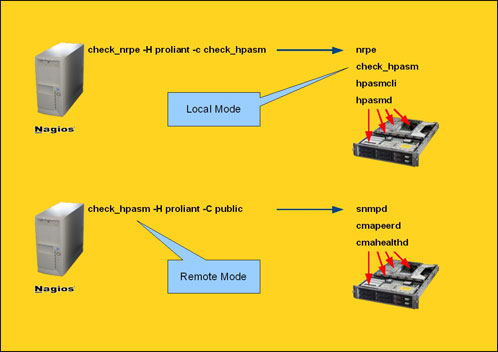
Vergleich der beiden Betriebsarten lokal und remote.

Verbosity

Zu Debuggingzwecken kann das Plugin auch mit der Option −−verbose (bzw. -v) aufgerufen werden. Es werden dann detailliert die Stati der einzelnen Hardwarekomponenten ausgegeben.

nagios$ check_hpasm -v
CRITICAL - dimm module 0:5 (module 5 @ cartridge 0) needs attention (degraded), System: 'proliant dl360 g5', S/N: '3UH841N09K', ROM: 'P58 08/03/2008'
checking cpus
cpu 0 is ok
cpu 1 is ok
checking power supplies
powersupply 1 is ok
powersupply 2 is ok
checking fans
fan 1 is present, speed is normal, pctmax is 50%, location is powerSupply, redundance is redundant, partner is 2
fan 2 is present, speed is normal, pctmax is 50%, location is cpu, redundance is redundant, partner is 3
fan 3 is present, speed is normal, pctmax is 50%, location is cpu, redundance is redundant, partner is 1
checking temperatures
1 ioBoard temperature is 42C (65 max)
2 ambient temperature is 18C (40 max)
3 cpu temperature is 30C (95 max)
4 cpu temperature is 30C (95 max)
5 powerSupply temperature is 29C (60 max)
checking memory
dimm module 0:1 (module 1 @ cartridge 0) is ok
dimm module 0:2 (module 2 @ cartridge 0) is ok
dimm module 0:3 (module 3 @ cartridge 0) is ok
dimm module 0:4 (module 4 @ cartridge 0) is ok
dimm module 0:5 (module 5 @ cartridge 0) needs attention (degraded)
dimm module 0:6 (module 6 @ cartridge 0) is ok
dimm module 0:7 (module 7 @ cartridge 0) is ok
dimm module 0:8 (module 8 @ cartridge 0) is ok
checking disk subsystem
da controller 0 in slot 0 is ok
controller accelerator is ok
controller accelerator battery is ok
logical drive 0:1 is ok (distribDataGuard)
physical drive 0:0 is ok
physical drive 0:1 is ok
physical drive 0:2 is ok
physical drive 0:3 is ok
physical drive 0:4 is ok
physical drive 0:5 is ok | fan_1=50% fan_2=50% fan_3=50% temp_1_ioBoard=42;65;65 temp_2_ambient=18;40;40 temp_3_cpu=30;95;95 temp_4_cpu=30;95;95 temp_5_powerSupply=29;60;60

–verbose (bzw. -v) kann mehrmals angegeben werden oder ein numerisches Argument erhalten. Die höchste Stufe ist -vvv. Mit dieser Einstellung erhält man einen kompletten Dump der verbauten Komponenten mit allen Details.

nagios$ check_hpasm -vvv
...
[CPU_0]
cpqSeCpuSlot: 0
cpqSeCpuUnitIndex: 0
cpqSeCpuName: Intel Xeon
cpqSeCpuStatus: ok
info: cpu 0 is ok
 
[PS_1]
cpqHeFltTolPowerSupplyBay: 1
cpqHeFltTolPowerSupplyChassis: 0
cpqHeFltTolPowerSupplyPresent: present
cpqHeFltTolPowerSupplyCondition: ok
cpqHeFltTolPowerSupplyRedundant: redundant
info: powersupply 1 is ok
...
[FAN_1]
cpqHeFltTolFanChassis: 1
cpqHeFltTolFanIndex: 1
cpqHeFltTolFanLocale: powerSupply
cpqHeFltTolFanPresent: present
cpqHeFltTolFanType: spinDetect
cpqHeFltTolFanSpeed: normal
cpqHeFltTolFanRedundant: redundant
cpqHeFltTolFanRedundantPartner: 2
cpqHeFltTolFanCondition: ok
cpqHeFltTolFanHotPlug: nonHotPluggable
info: fan 1 is present, speed is normal, pctmax is 50%, location is powerSupply, redundance is redundant, partner is 2
...
[PHYSICAL_DRIVE]
cpqDaPhyDrvCntlrIndex: 0
cpqDaPhyDrvIndex: 4
cpqDaPhyDrvBay: 5
cpqDaPhyDrvBusNumber: 1
cpqDaPhyDrvSize: 1864
cpqDaPhyDrvStatus: ok
cpqDaPhyDrvCondition: ok
...

Blacklisting

Wenn ausgefallene/fehlende Komponenten ausgeblendet werden sollen, so dass sie keinen Alarm auslösen können, benutzt man die Option –blacklist. Man übergibt dem Plugin mit dieser Option eine durch / getrennte Liste von Komponenten folgenden Formats:

<typ>:<nr>[,<nr>...][/<typ>:<nr>[,<nr>...]]…

wobei für <typ> jeweils eines der folgenden Kürzel steht:

cpu c
powersupply p
fan f
overall fan status ofs
temperature t
dimm d
da controller daco
da controller accelerator daac
da controller accelerator battery daacb
da logical drive dald
da physical drive dapd
scsi controller scco
scsi logical drive scld
scsi physical drive scpd
fcal controller fcaco
fcal accelerator fcaac
fcal host controller fcahc
fcal host controller overall condition fcahco
fcal logical drive fcald
fcal physical drive fcapd
fuse fu
enclosure manager em

Die <nr> der entsprechenden Komponente erhält man, wenn check_hpasm mit -v aufgerufen wird.

checking cpus
cpu 0 is ok                                                             | c:0
cpu 1 is ok                                                             | c:1
checking power supplies
powersupply 1 is ok                                                     | p:1
powersupply 2 is ok                                                     | p:2
checking fans
fan 1 is present, speed is normal, ....                                 | f:1
fan 2 is present, speed is normal, ....                                 | f:2
fan 3 is present, speed is normal, ....                                 | f:3
overall fan status: fan=ok, cpu=ok
checking temperatures
1 ioBoard temperature is 42C (65 max)                                   | t:1
2 ambient temperature is 18C (40 max)                                   | t:2
3 cpu temperature is 30C (95 max)                                       | t:3
4 cpu temperature is 30C (95 max)                                       | t:4
5 powerSupply temperature is 29C (60 max)                               | t:5
checking memory
dimm module 0:1 (module 1 @ cartridge 0) is ok                          | d:0:1
dimm module 0:2 (module 2 @ cartridge 0) is ok                          | d:0:2
dimm module 0:3 (module 3 @ cartridge 0) is ok                          | d:0:3
dimm module 0:4 (module 4 @ cartridge 0) is ok                          | d:0:4
dimm module 0:5 (module 5 @ cartridge 0) needs attention (degraded)     | d:0:5
dimm module 0:6 (module 6 @ cartridge 0) is ok                          | d:0:6
dimm module 0:7 (module 7 @ cartridge 0) is ok                          | d:0:7
dimm module 0:8 (module 8 @ cartridge 0) is ok                          | d:0:8
checking disk subsystem
da controller 3 in slot 0 is ok                                         | daco:3
controller accelerator is ok                                            | daac:3
controller accelerator battery is ok                                    | daacb:3
logical drive 3:1 is ok (mirroring)                                     | dald:3:1
logical drive 3:2 is ok (mirroring)                                     | dald:3:2
physical drive 3:0 is ok                                                | dapd:3:0
physical drive 3:1 is ok                                                | dapd:3:1
physical drive 3:2 is ok                                                | dapd:3:2
physical drive 3:3 is ok                                                | dapd:3:3
ide controller 0 in slot -1 is ok and unused                            | ideco:0
fcal controller 1:0 in box 1/slot 0 needs attention (degraded)          | fcaco:1:0
fcal accelerator in box 1/slot 0 is temp disabled                       | fcac:1:0
logical drive 1:1 is failed (advancedDataGuard)                         | fcald:1:1
physical drive 1:128 is failed                                          | fcapd:1:128
physical drive 1:129 is ok                                              | fcapd:1:129
physical drive 1:130 is failed                                          | fcapd:1:130
physical drive 1:131 is ok                                              | fcapd:1:131
physical drive 1:132 is failed                                          | fcapd:1:132
physical drive 1:133 is ok                                              | fcapd:1:133
physical drive 1:134 is ok                                              | fcapd:1:134
physical drive 1:135 is ok                                              | fcapd:1:135
physical drive 1:144 is ok                                              | fcapd:1:144
physical drive 1:145 is ok                                              | fcapd:1:145
physical drive 1:147 is unconfigured                                    | fcapd:1:147
fcal host controller 0 in slot 1 is ok                                  | fcahc:0
fcal host controller 1 in slot 1 is ok                                  | fcahc:1

Angenommen, es soll das defekte Speichermodul und die drei ausgefallenen Platten (inklusive des logischen Laufwerks) ausgeblendet werden, so lautet das Argument für −−blacklist

d:0:5/fcapd:1:128,1:130,1:132/fcald:1:1

Alternativ kann der Option −−blacklist auch ein Dateiname übergeben werden, in deren erster Zeile diese Liste der auszublendenden Komponenten steht.

Eigene Temperaturschwellwerte

Wenn die vom System gelieferten Temperaturschwellwerte durch eigene ersetzt werden sollen, dann gibt man dies mit der Option −−customthresholds an.

nagios$ check_hpasm
...
1 cpu temperature is 45C (62 max)
2 cpu temperature is 56C (80 max)
3 ioBoard temperature is 38C (60 max)
4 cpu temperature is 59C (80 max)
5 powerSupply temperature is 31C (53 max)
...
 
nagios$ check_hpasm --customthresholds 1:70/5:65
...
1 cpu temperature is 45C (70 max)
2 cpu temperature is 56C (80 max)
3 ioBoard temperature is 38C (60 max)
4 cpu temperature is 59C (80 max)
5 powerSupply temperature is 31C (65 max)
...

Performancedaten

Mit der Option −−perfdata kann die Ausgabe von Performance Data eingeschaltet werden, falls dies nicht bereits bei der Installation als Default gewünscht wurde. (Sollten die Performancedaten zu lang werden, kann mit –perfdata=short eine Kurzform der Temperatur-Tags ausgegeben werden. Die Location wird dann weggelassen)

nagios$ check_hpasm
OK - hardware working fine| fan_1=8%;0;0 fan_2=8%;0;0  fan_3=15%;0;0 fan_4=15%;0;0 fan_5=8%;0;0 fan_6=8%;0;0 fan_7=20%;0;0 fan_8=20%;0;0 'temp_1_processor_zone'=38;62;62 'temp_2_cpu#1'=37;73;73 'temp_3_i/o_zone'=49;68;68 'temp_4_cpu#2'=40;73;73 'temp_5_power_supply_bay'=36;44;44
 
nagios$ check_hpasm --perfdata short
OK - hardware working fine| fan_1=8%;0;0 fan_2=8%;0;0  fan_3=15%;0;0 fan_4=15%;0;0 fan_5=8%;0;0 fan_6=8%;0;0 fan_7=20%;0;0 fan_8=20%;0;0 'temp_1'=38;62;62 'temp_2'=37;73;73 'temp_3'=49;68;68 'temp_4'=40;73;73 'temp_5'=36;44;44

Unbekannter Zustand des Hauptspeichers

Bei manchen Bios-Versionen werden die Speichermodule von hpasmcli nicht korrekt angezeigt. Der Befehl SHOW DIMM liefert dann nur eine Liste von Modulen mit Zustand n/a, was normalerweise als Warning gewertet wird. Mit der Option -i bzw. −−ignore-dimms kann man die Speicherprüfung auch ohne Blacklist überspringen und so die Warning vermeiden.

Nicht-redundante Lüfter

Sollte eine Warnung kommen, daß sämtliche Lüfter nicht redundant seien, dann sind vermutlich einzelne Lüfter statt Lüfterpaare verbaut worden. Mit −−ignore-fan-redundancy kann die Prüfung auf Redundanz abgeschaltet werden. (Siehe README).

Leider ist es nicht möglich, die Lüfterdrehzahlen (bzw. Prozent der maximalen Drehzahl) per SNMP zu bekommen. Es wird daher ein Ersatzwert von 50% angezeigt.


Installation

  • Nach dem Auspacken des Archivs wird ./configure aufgerufen. Man beachte insbesondere die Option −−with-noinst-level, mit der man bestimmt, welchen Exitcode das Plugin bei fehlendem hpasm zurückliefert. Mit der Option −−with-degrees gibt man an, ob die Ausgabe der Temperaturwerte in Celsius (Default) oder Fahrenheit erfolgen soll. Mit der Option −−enable-perfdata schaltet man die defaultmäßige Ausgabe von Performance Data ein. Wenn man die defaultmäßige Ausgabe von Typ, Seriennummer und Biosversion nicht in der Ausgabe sehen will, dann schaltet man dies mit −−disable-hwinfo ab. Mit −−enable-hpacucli schaltet man zusätzlich die Überprüfung der Array-Controller ein.
  • Das für die Distribution geeignete hpasm RPM muss installiert sein. (Bezugsquelle siehe Liste der Links weiter unten).
  • Falls das Plugin (in der Betriebsart “Lokal”) durch einen nichtprivilegierten Benutzer aufgerufen wird, so muss dieser eine entsprechende Sudo-Berechtigung bekommen, um /sbin/hpasmcli als Root aufrufen zu dürfen. (Gilt ebenso für /usr/sbin/hpacucli)


Beispiele

Weitere Beispiele für mögliche Fehlersituationen:

Defektes Speichermodul:

nagios$ check_hpasm
CRITICAL - dimm module 2 @ cartridge 2 needs attention (dimm is degraded)
 
nagios$ check_hpasm -v
checking hpasmd process
System        :proliant dl580 g3
Serial No.    :GB8632FB7V
ROM version   :P38 04/28/2006
checking cpus
 cpu 0 is ok
 cpu 1 is ok
 cpu 2 is ok
 cpu 3 is ok
checking power supplies
 powersupply 1 is ok
 powersupply 2 is ok
checking fans
checking temperatures
 1 cpu#1 temparature is 36 (80 max)
 2 cpu#2 temparature is 34 (80 max)
 3 cpu#3 temparature is 33 (80 max)
 4 cpu#4 temparature is 37 (80 max)
 5 i/o_zone temparature is 32 (60 max)
 6 ambient temparature is 23 (40 max)
 7 system_bd temparature is 34 (60 max)
checking memory modules
 dimm 1@1 is ok
 dimm 2@1 is ok
 dimm 3@1 is ok
 dimm 4@1 is ok
 dimm 1@2 is ok
 dimm 2@2 is dimm is degraded
 dimm 3@2 is ok
 dimm 4@2 is ok
CRITICAL - dimm module 2 @ cartridge 2 needs attention (dimm is degraded)

Stromversorgungsmodul defekt:

nagios$ ./check_hpasm
CRITICAL - powersuply #2 needs attention (failed), powersuply #1 is not redundant
nagios$ ./check_hpasm -v
checking hpasmd process
System        :proliant dl580 g4
Serial No.    :GB8637M8TH
ROM version   :P59 09/08/2006
checking cpus
 cpu 0 is ok
 cpu 1 is ok
 cpu 2 is ok
 cpu 3 is ok
checking power supplies
 powersupply 1 is ok
 powersupply 2 is failed
checking fans
checking temperatures
 1 cpu#1 temparature is 42 (85 max)
 2 cpu#2 temparature is 46 (85 max)
 3 cpu#3 temparature is 44 (85 max)
 4 cpu#4 temparature is 44 (85 max)
 5 i/o_zone temparature is 39 (60 max)
 6 ambient temparature is 27 (40 max)
 7 system_bd temparature is 41 (60 max)
checking memory modules
 dimm 1@1 is ok
 dimm 2@1 is ok
 dimm 3@1 is ok
 dimm 4@1 is ok
 dimm 1@2 is ok
 dimm 2@2 is ok
 dimm 3@2 is ok
 dimm 4@2 is ok
 dimm 1@3 is ok
 dimm 2@3 is ok
 dimm 3@3 is ok
 dimm 4@3 is ok
 dimm 1@4 is ok
 dimm 2@4 is ok
CRITICAL - powersuply #2 needs attention (failed),  powersuply #1 is not redundant

Stromversorgungsmodul wurde gezogen:

nagios$ ./check_hpasm
CRITICAL - powersuply #2 is missing, powersuply #1 is not redundant
nagios$ ./check_hpasm -v
checking hpasmd process
System        :proliant dl580 g4
Serial No.    :GB8637M8TH
ROM version   :P59 09/08/2006
checking cpus
 cpu 0 is ok
 cpu 1 is ok
 cpu 2 is ok
 cpu 3 is ok
checking power supplies
 powersupply 1 is ok
 powersupply 2 is n/a
checking fans
checking temperatures
 1 cpu#1 temparature is 42 (85 max)
 2 cpu#2 temparature is 46 (85 max)
 3 cpu#3 temparature is 44 (85 max)
 4 cpu#4 temparature is 44 (85 max)
 5 i/o_zone temparature is 39 (60 max)
 6 ambient temparature is 27 (40 max)
 7 system_bd temparature is 41 (60 max)
checking memory modules
 dimm 1@1 is ok
 dimm 2@1 is ok
 dimm 3@1 is ok
 dimm 4@1 is ok
 dimm 1@2 is ok
 dimm 2@2 is ok
 dimm 3@2 is ok
 dimm 4@2 is ok
 dimm 1@3 is ok
 dimm 2@3 is ok
 dimm 3@3 is ok
 dimm 4@3 is ok
 dimm 1@4 is ok
 dimm 2@4 is ok
CRITICAL - powersuply #2 is missing, powersuply #1 is not redundant

Hpasm Daemon läuft nicht:

nagios$ check_hpasm
CRITICAL - hpasmd needs to be started

Hpasm Paket ist nicht installiert:

OK - hardware working fine, at least i hope so because hpasm is not installed


Aufruf zum Mitmachen

Bitte rufen sie check_hpasm auf möglichst vielen Plattformen mit der -v Option auf. Möglicherweise haben sie ein selteneres Proliant-Modell, dessen Komponenten nicht vollständig erkannt werden. Sie erhalten dann einen Hinweis, wie sie den Autor darüber informieren können.

Folgende Zeile taucht dabei häufig auf, kann aber ignoriert werden:

#0 SYSTEM_BD - -

Ich bin immer an Testdaten interessiert. Wenn sie mir einen Gefallen tun wollen, schicken sie mir die Ausgabe von

snmpwalk ... <ip-adresse> 1.3.6.1.4.1.232

oder, falls sie die lokale Variante einsetzen, die Ausgabe des folgenden Scripts:

hpasmcli=$(which hpasmcli)
hpacucli=$(which hpacucli)
for i in server powersupply fans temp dimm
do
  $hpasmcli -s "show $i" | while read line
  do
    printf '%s %s\n' $i "$line"
  done
done
if [ -x "$hpacucli" ]; then
  for i in config status
  do
    $hpacucli ctrl all show $i | while read line
    do
      printf '%s %s\n' $i "$line"
    done
  done
fi


Download

check_hpasm-4.2.tar.gz

check_hpasm-4.2.shar.gz


Externe Links


Changelog

  • 2010-03-30 4.2 Bladesystems: Enclosure managers, Fuses und Temperaturen werden jetzt abgefragt (wobei letztere anscheinend von HP nicht implmementiert wurden. Ich habe jedenfalls noch nie welche in einem snmpwalk gesehen), Proliant: blacklisting für SCSI-Controller und -Platten (Danke Marco Hill)und für Overall Fan Status (Danke Thomas Jampen)
  • 2010-02-09 4.1.2 Bugfix im local mode bei mehreren Logical Drives (Danke Trond Hasle).
  • 2009-01-07 4.1.1 Zusätzliche SmartArray-Typen werden jetzt im local mode erkannt (Danke Trond Hasle).
  • 2009-12-07 4.1 Bugfix beim Powersupply-Check mit hpasmcli, Bladecenter werden jetzt detaillierter abgefragt.
  • 2009-12-04 4.0.1 Option –help ergänzt, Bugfix in Celsius-Fahrenheit-Umrechnung, Fan Logik verbessert, bessere Erkennung von Modellen, die den Produkttyp nicht preisgeben (cpqsinfo-mib-error)
  • 2009-11-30 4.0 Komplettes Code-Redesign, Unterstützung für G6-Modelle, neue Blacklist-Regeln, Verbose-Mode mit detaillierter Ausgabe der gefundenen Hardwarekomponenten, Unterstützung von HP BladeCenter (cpqRack-MIB) und HP Storage-Systemen (cpqStorage MIB).
  • 2009-03-20 3.5 Support für SNMPv3, Bugfix wg. missing Dimms die tatsächlich degraded waren, neuer Parameter –port, Support für MSA20, Hinweis, wenn /etc/sudoers nicht passt. (Danke Jeff the Riffer, matt at adicio.com)
  • 2009-02-06 3.1.1 Bugfix, der Perl-Warnings beseitigt (Dank an Bill Katz und Martin Hofmann)
  • 2009-01-23 3.1 IDE und SAS-Platten werden überwacht
  • 2008-11-05 3.0.7.1 Kleiner Bugfix, snmpwalk verwendet jetzt -On
  • 2008-11-29 3.0.7 Bugfix in Controller-Blacklist. Fallback mit –snmpwalk <snmpwalk-binary> braucht kein Net::SNMP mehr.
  • 2008-10-30 3.0.6 Bugfix in –ignore-dimms
  • 2008-10-24 3.0.5 Kürzere Laufzeit dank weniger SNMP-Daten (Danke Yannick Gravel). Neue Option –ignore-fan-redundancy.
  • 2008-09-18 3.0.4 SNMP Dimm Code umgekrempelt. Was jetzt noch als n/a angezeigt wird, bleibt auch n/a.
  • 2008-09-11 3.0.3.2 -P ist jetzt optional (Bugfix)
  • 2008-09-10 3.0.3.1 -P bugfixes
  • 2008-09-10 3.0.3 Bugfix in snmpwalk cpqHeComponents. Neuer Parameter –protocol (default: 2c)
  • 2008-07-31 3.0.1 Bugfix in customthreshold (Danke TheCry)
  • 2008-07-28 3.0 SNMP (Dank an Matthias Flacke)
  • 2008-04-16 2.0.3.1 configure-Bug beseitigt. (–with-perl, –with-perfdata)
  • 2008-04-09 2.0.3 Blacklisting für Controller. Dimm-Bug gefixt.
  • 2008-02-11 2.0.2 unbestückte CPU/Lüfter-Sockel werden übergangen.
  • 2008-02-08 2.0.1 mehrzeilige Ausgabe für Nagios 3.x
  • 2008-02-08 2.0 Code Redesign, Raid Controller werden gecheckt.
  • 2008-01-18 1.6.2.2 Irreführende Meldung unter Debian 3.1 beseitigt.
  • 2007-12-12 1.6.2.1 Bugfix. Lüfter wurden übersehen.
  • 2007-11-16 1.6.2 Neue Option -i, Ausgabe von Typ, Bios-Release und Seriennummer. (Dank an Marcus Fleige)
  • 2007-11-07 1.6.1 Bugfix. Defekte Lüfter wurden u.U. übersehen. Einfache Hochkommas für Performancedaten.
  • 2007-07-27 1.6 Performancedaten
  • 2007-06-14 1.5 Neue Option für eigene Temperaturschwellwerte.
  • 2007-05-22 1.4 Unterstützung von hpasmxld und hpasmlited.
  • 2007-04-18 1.3 configure um –with-degrees ergänzt. Neue Option –blacklist
  • 2007-04-16 1.2 configure um –with-noinst-level ergänzt.
  • 2007-04-14 1.1 erste öffentliche Version.


Copyright

Gerhard Laußer

Check_hpasm wird unter der GNU General Public License zur Verfügung gestellt. GPL

Autor

Gerhard Laußer (gerhard.lausser@consol.de) beantwortet gerne Fragen zu diesem Plugin.

Print This Page Print This Page


107 Responses to “check_hpasm”

  1. Piotr Palka Says:
    October 30th, 2009 at 0:05

    Hi! Found bug in a script, first power supply is not recognized, script depends on empty line between them. hpasmcli> show powersupply Power supply #1         Present  : Yes         Redundant: No         Condition: FAILED         Hotplug  : Supported Power supply #2         Present  : Yes         Redundant: No         Condition: Ok         Hotplug  : Supported

    [Reply]

    lausser Reply:

    That’s indeed a severe bug. Thank you for bringing this to my notice. Gerhard

    [Reply]

    Guenther Sommer Reply:

    @lausser, Is there already a fix available or workaround (patch)? Can this be done soon, I would really need this (and can’t find in the code where it gets evaluated.

    [Reply]

    Martin Reply:

    Hi Lausser,

    Do you have a fix for this bug yet? It’s a great script.

    [Reply]

    lausser Reply:

    Have a look at the blog entry “check_hpasm Sneak Preview II”. This pre-release should handle it. Please try it and mail me immediately if you have problems. I wanted to release 4.0 in the next days.

    [Reply]

    Acid Reply:

    @lausser,

    Hi,

    I’m testing the 4.0.1 version on a dl360g4, the power supplies do not show at all :

    OK – System: ‘proliant dl360 g4p’, S/N: ‘CZJ64202ST’, ROM: ‘P54 07/16/2007′, hardware working fine, da: 1 logical drives, 2 physical drives, cpu_0=ok fan_1=49% fan_2=49% temp_1=32 temp_2=37 temp_4=29 temp_5=23 checking cpus cpu 0 is ok checking power supplies checking fans fan 1 is present, speed is normal, pctmax is 49%, location is processor_zone, redundance is notRedundant, partner is 0 fan 2 is present, speed is normal, pctmax is 49%, location is system, redundance is notRedundant, partner is 0 checking temperatures 1 i/o_zone temperature is 32C (63 max) 2 cpu#1 temperature is 37C (85 max) 4 power_supply_bay temperature is 29C (48 max) 5 system_bd temperature is 23C (41 max) checking memory dimm module 0:1 (module 1 @ cartridge 0) is ok dimm module 0:2 (module 2 @ cartridge 0) is ok dimm module 0:3 (module 3 @ cartridge 0) is ok dimm module 0:4 (module 4 @ cartridge 0) is ok checking disk subsystem da controller 1 in slot 0 is ok controller accelerator is ok controller accelerator battery is notPresent logical drive 1:1 is ok (raid 1) physical drive 1:0 is ok physical drive 1:1 is ok

    Acid Reply:

    @lausser,

    Here are the output of hpasmcli and the hp-health version : hpasmcli> show powersupply Power supply #1 Present : Yes Redundant: Yes Condition: Ok Hotplug : Supported Power supply #2 Present : Yes Redundant: Yes Condition: Ok Hotplug : Supported hpasmcli> quit [root@maribor ~]# rpm -qa | grep hp-health hp-health-8.3.2.2-1

    lausser Reply:

    Hi Acid, have a look at the script under “call to participate” above. Please mail me the output of that script.

  2. Monitor hardware-health on HP Proliant ML370 G3 with Nagios « Mozekoze Says:
    November 7th, 2009 at 22:50

    [...] For nagios you’ll need the check_hpasm plugin, found here. [...]

  3. Claudio Says:
    November 10th, 2009 at 11:22

    Using this plugin for years now and still like it! Great work! Thanks for continuing the plugin!

    [Reply]

  4. Ovidiu Says:
    November 26th, 2009 at 8:02

    How do you use this script with windows servers?

    [Reply]

    lausser Reply:

    You need the hp system management driver and agent packages (look at the links above). Then you can query the server with SNMP. (check_hpasm –hostname –community …)

    [Reply]

  5. normes Says:
    November 30th, 2009 at 10:34

    I’m sorry, but the Windows HP software (your link above) couldn’t installed on Proliant DL360 G6. Now I’m unsure which components I have to install from HP: HP Version Control Repository Manager HP System Management Homepage for Windows HP Version Control Agent for Windows HP ProLiant Array Configuration Utility (CLI) for Windows HP ProLiant Array Configuration Utility for Windows HP Insight Management WBEM Providers for Windows Server 2003/2008 HP ProLiant Integrated Management Log Viewer for Windows HP ProLiant Remote Monitor Service for Windows Server 2003/2008 HP Insight Diagnostics Online Edition for Windows Server 2003/2008 HP Insight Management Agents for Windows Server 2003/2008 HP NULL IPMI Controller Driver for Windows Server 2003 HP Insight Management WBEM Providers for Windows Server 2003/2008 Virtual Server Environment 4.1 Update1 HP ProLiant Array Diagnostics Utility for Windows HP ProLiant Firmware Inventory Agent for System Center Configuration Manager 2007

    There are so many different packages… But no “Win2003 System Management Driver”. I’m using already the Windows integrated SNMP Server, so I hope I can use that with the HP tools.

    Thanks,

    Norman
    

    [Reply]

  6. Geir O. Høgberg Says:
    December 3rd, 2009 at 17:28

    Possible error regarding performance output. I see that it reports that -p is not a valid option anymore, fixed that with –enable-perfdata. Also, I get no output when I run ./check_hpasm -h or –help :) Besides from that, working as a charm and reporting good it seems. We are looking into some of the new things it picked up to see if they’re correct.

    Thanks, Geir

    [Reply]

  7. tex Says:
    December 4th, 2009 at 2:02

    This is in the blog part of the site, but I wanted to note it here: there is a bug when compiling to use Fahrenheit, so until fixed one may want to stick with Celsius.

    [Reply]

  8. Xavier Capell Says:
    December 7th, 2009 at 19:13

    I am trying to blacklist an msa1000 controller but with no luck trying with the “-b” parameter. When I execute the following command I get the following output:

    check_hpasm -v -H hostname -c public

    …. … msa1000 controller in box 1 slot 1 needs attention msa1000 controller in box 1 slot 2 needs attention ….

    I would like to blacklist these two entries. Is it possible? which argument should I send with the -b option?

    thanks

    [Reply]

    lausser Reply:

    Looks like you are using the old 3.x version of check_hpasm. You can’t blacklist a msa with it. Please upgrade to 4.1 and post the output again.

    [Reply]

  9. Peter R. Says:
    December 8th, 2009 at 12:40

    Hallo, das ist ein wirklich tolles Tool, aber leider funktioniert es nicht ganz auf einem ‘proliant dl385 g2′ mit ‘hp-health-8.3.0′

    check_hpasm (4.1) sagt: fan ist NICHT redundant:

    fan 1 is present, speed is normal, pctmax is 50%, location is i/o_zone, redundance is notRedundant, partner is 0 …

    hpasmcli sagt: fan IST redundant: Fan Location Present Speed of max Redundant Partner Hot-pluggable — ——– ——- —– —— ——— ——- ————-

    1 I/O_ZONE Yes NORMAL 50% Yes 0 Yes

    … Dabei glaube ich eher dem hpasmcli…

    Schöne Grüße Peter

    [Reply]

    lausser Reply:

    Ein Stück weiter oben steht unter “Aufruf zum Mitmachen” ein Script. Bitte schick mir dessen Output per Mail zu.

    [Reply]

    lausser Reply:

    Jetzt verstehe ich, was da passiert ist.

    fans Fan  Location        Present Speed  of max  Redundant  Partner  Hot-pluggable
    fans ---  --------        ------- -----  ------  ---------  -------  -------------
    fans #1   I/O_ZONE        Yes     NORMAL  50%     Yes        0        Yes
    fans #2   I/O_ZONE        Yes     NORMAL  50%     Yes        0        Yes
    
    Normalerweise sollte bei einem redundanten Fan unter der Spalte “Partner” die Nummer des anderen Fans stehen, mit dem zusammen er ein redundantes Pärchen bildet. Die Null weist darauf hin, dass etwas nicht stimmt. Das muss aber kein physikalisches Problem sein, es gibt auch zahlreiche Firmwarestände, auf die nicht 100% Verlass ist. Daher habe ich es so programmiert, dass in dem Fall der Lüfter von “redundant” auf “notRedundant” zurückgestuft wird. Dies führt aber nicht zu einem Fehler, da ein Partner=0 auch angezeigt wird, wenn z.B. bei 1-CPU-Maschinen anstelle des zweiten Lüfters nur ein Dummy eingebaut wird. In diesem Fall ist das nicht so, da man ja die Drehzahlen sieht. Zugegeben, die Ausgabe von check_hpasm entspricht nicht der von hpasmcli, aber auch dessen Angaben sind irreführend.

    Ich hoffe, damit können sie leben.

    [Reply]

  10. paul snoep Says:
    December 9th, 2009 at 13:22

    Hi,

    Great plugin, however for some mysterious reason our disk array is with the check_hpasm not recognized. We do can get output when run from commandline. My perl knowledge is too limited to debug and/or find the cause. Can you help?

    Thanks

    pacucli ctrl all show status

    Smart Array P400i in Slot 0 (Embedded) Controller Status: OK Cache Status: OK Battery/Capacitor Status: OK

    hpacucli ctrl all show config

    Smart Array P400i in Slot 0 (Embedded) (sn: PH8CMQ4778 )

    array A (SAS, Unused Space: 0 MB)

      logicaldrive 1 (341.7 GB, RAID 5, OK)

    physicaldrive 1I:1:1 (port 1I:box 1:bay 1, SAS, 72 GB, OK) physicaldrive 1I:1:2 (port 1I:box 1:bay 2, SAS, 72 GB, OK) physicaldrive 1I:1:3 (port 1I:box 1:bay 3, SAS, 72 GB, OK) physicaldrive 1I:1:4 (port 1I:box 1:bay 4, SAS, 72 GB, OK) physicaldrive 2I:1:5 (port 2I:box 1:bay 5, SAS, 72 GB, OK) physicaldrive 2I:1:6 (port 2I:box 1:bay 6, SAS, 72 GB, OK)

    [Reply]

    lausser Reply:

    Hi Paul, scroll up to the section “call to participate” and you will find a small shellscript. Can you run it and mail me the output please?

    [Reply]

    paul snoep Reply:

    @lausser,

    Hi,

    Below the requested output of the script.

    Thanks Paul

    server server System : ProLiant DL360 G5 server Serial No. : CZJ902A7RF server ROM version : P58 05/18/2009 server iLo present : Yes server Embedded NICs : 2 server NIC1 MAC: 00:23:7d:a2:22:8e server NIC2 MAC: 00:23:7d:a2:22:96 server server Processor: 0 server Name : Intel Xeon server Stepping : 10 server Speed : 3000 MHz server Bus : 1333 MHz server Core : 4 server Thread : 4 server Socket : 1 server Level2 Cache : 12288 KBytes server Status : Ok server server Processor: 1 server Name : Intel Xeon server Stepping : 10 server Speed : 3000 MHz server Bus : 1333 MHz server Core : 4 server Thread : 4 server Socket : 2 server Level2 Cache : 12288 KBytes server Status : Ok server server Processor total : 2 server server Memory installed : 8192 MBytes server ECC supported : Yes server powersupply powersupply Power supply #1 powersupply Present : Yes powersupply Redundant: Yes powersupply Condition: Ok powersupply Hotplug : Supported powersupply Power supply #2 powersupply Present : Yes powersupply Redundant: Yes powersupply Condition: Ok powersupply Hotplug : Supported powersupply fans fans Fan Location Present Speed of max Redundant Partner Hot-pluggable fans — ——– ——- —– —— ——— ——- ————- fans #1 POWERSUPPLY_BAY Yes NORMAL 34% Yes 0 No fans #2 CPU#2 Yes NORMAL 29% Yes 0 No fans #3 CPU#1 Yes NORMAL 37% Yes 0 No fans fans temp temp Sensor Location Temp Threshold temp —— ——– —- ——— temp #1 I/O_ZONE 44C/111F 65C/149F temp #2 AMBIENT 20C/68F 40C/104F temp #3 CPU#1 30C/86F 95C/203F temp #4 CPU#1 30C/86F 95C/203F temp #5 POWER_SUPPLY_BAY 33C/91F 60C/140F temp #6 CPU#2 30C/86F 95C/203F temp #7 CPU#2 30C/86F 95C/203F temp temp dimm dimm DIMM Configuration dimm —————— dimm Cartridge #: 0 dimm Module #: 1 dimm Present: Yes dimm Form Factor: fh dimm Memory Type: 14h dimm Size: 1024 MB dimm Speed: 667 MHz dimm Supports Lock Step: No dimm Configured for Lock Step: No dimm Status: Ok dimm dimm Cartridge #: 0 dimm Module #: 2 dimm Present: Yes dimm Form Factor: fh dimm Memory Type: 14h dimm Size: 1024 MB dimm Speed: 667 MHz dimm Supports Lock Step: No dimm Configured for Lock Step: No dimm Status: Ok dimm dimm Cartridge #: 0 dimm Module #: 3 dimm Present: Yes dimm Form Factor: fh dimm Memory Type: 14h dimm Size: 1024 MB dimm Speed: 667 MHz dimm Supports Lock Step: No dimm Configured for Lock Step: No dimm Status: Ok dimm dimm Cartridge #: 0 dimm Module #: 4 dimm Present: Yes dimm Form Factor: fh dimm Memory Type: 14h dimm Size: 1024 MB dimm Speed: 667 MHz dimm Supports Lock Step: No dimm Configured for Lock Step: No dimm Status: Ok dimm dimm Cartridge #: 0 dimm Module #: 5 dimm Present: Yes dimm Form Factor: fh dimm Memory Type: 14h dimm Size: 1024 MB dimm Speed: 667 MHz dimm Supports Lock Step: No dimm Configured for Lock Step: No dimm Status: Ok dimm dimm Cartridge #: 0 dimm Module #: 6 dimm Present: Yes dimm Form Factor: fh dimm Memory Type: 14h dimm Size: 1024 MB dimm Speed: 667 MHz dimm Supports Lock Step: No dimm Configured for Lock Step: No dimm Status: Ok dimm dimm Cartridge #: 0 dimm Module #: 7 dimm Present: Yes dimm Form Factor: fh dimm Memory Type: 14h dimm Size: 1024 MB dimm Speed: 667 MHz dimm Supports Lock Step: No dimm Configured for Lock Step: No dimm Status: Ok dimm dimm Cartridge #: 0 dimm Module #: 8 dimm Present: Yes dimm Form Factor: fh dimm Memory Type: 14h dimm Size: 1024 MB dimm Speed: 667 MHz dimm Supports Lock Step: No dimm Configured for Lock Step: No dimm Status: Ok dimm dimm config config Smart Array P400i in Slot 0 (Embedded) (sn: PH8CMQ4778 ) config config array A (SAS, Unused Space: 0 MB) config config logicaldrive 1 (341.7 GB, RAID 5, OK) config config physicaldrive 1I:1:1 (port 1I:box 1:bay 1, SAS, 72 GB, OK) config physicaldrive 1I:1:2 (port 1I:box 1:bay 2, SAS, 72 GB, OK) config physicaldrive 1I:1:3 (port 1I:box 1:bay 3, SAS, 72 GB, OK) config physicaldrive 1I:1:4 (port 1I:box 1:bay 4, SAS, 72 GB, OK) config physicaldrive 2I:1:5 (port 2I:box 1:bay 5, SAS, 72 GB, OK) config physicaldrive 2I:1:6 (port 2I:box 1:bay 6, SAS, 72 GB, OK) config status status Smart Array P400i in Slot 0 (Embedded) status Controller Status: OK status Cache Status: OK status Battery/Capacitor Status: OK status status

    [Reply]

    lausser Reply:

    Where is your hpacucli located? check_hpasm tries to find it in /usr/sbin/hpacucli and /usr/local/sbin/hpacucli. If it is unable to locate the command, the array check will be skipped. Maybe this is the cause.

    [Reply]

    paul snoep Reply:

    @lausser, It’s in /usr/sbin as below. root@asnlnm001:~# ls -al /usr/sbin/hpacucli -rwxr-xr-x 1 root root 676 2009-07-10 19:16 /usr/sbin/hpacucli

    [Reply]

  11. Waruna Says:
    December 18th, 2009 at 10:55

    hi All My error CRITICAL – sudo must be configured with requiretty=no (man sudo), System: ‘unknown’, S/N: ‘unknown’, ROM: ‘unknown’

    my configuration like this

    /etc/nagios/localhost.cfg

    define service{ use local-service host_name adlive service_description Check HP Hardware check_command check_hpasm }

    /etc/nagios/commands.cfg define command{ command_name check_hpasm command_line $USER1$/check_hpasm }

    And

    Add this lines to /etc/sudoers

    Cmnd_Alias HPASM = /usr/sbin/hpacucli, /sbin/hpacucli, /usr/lib/nagios/plugins/check_hpasm

    nagios ALL = HPASM

    nagios ALL=(ALL) NOPASSWD: ALL

    I get Error in nagios web interface

    CRITICAL – sudo must be configured with requiretty=no (man sudo), System: ‘unknown’, S/N: ‘unknown’, ROM: ‘unknown’

    Pl help to correct it

    [Reply]

    Waruna Reply:

    @Waruna, I can run check_hpasm without password like this

    [root@abcd plugins]# su nagios sh-3.2$ sudo ./check_hpasm OK – System: ‘proliant dl380 g5′, S/N: ‘SGA810XNVC’, ROM: ‘P56 08/03/2008′, hardware working fine sh-3.2$

    but I get Error in nagios web interface

    CRITICAL – sudo must be configured with requiretty=no (man sudo), System: ‘unknown’, S/N: ‘unknown’, ROM: ‘unknown’

    Pl help thnx

    [Reply]

    lausser Reply:

    You need sudo-privileges for the hpasmcli command, not for the check_hpasm plugin.

    [Reply]

    lausser Reply:

    Everything you need to to is mentioned in the error message. Read the sudo-manpage, look for requiretty and set this parameter in your /etc/sudoers to ‘no’. A running Nagios process has no controlling tty, that’s why you need this setting.

    [Reply]

    Waruna Reply:

    @lausser,

    Thank you.

    I comment Defaults requiretty entry in /etc/sudoers

    thank for help my friend Lakmal & lausser

    [Reply]

  12. netrogue Says:
    January 18th, 2010 at 15:11

    hi, we can monitor hp-ux with check_hpasm ?

    [Reply]

    lausser Reply:

    I never tried it. You surely cannot monitor hp-ux, but, if at all, the hardware of a server running hp-ux. Precondition is the presence of the CPQHLT-MIB. Try “snmpwalk … 1.3.6.1.4.1.232″. If you get a response, you might give check_hpasm a try.

    [Reply]

  13. Stefan Says:
    February 1st, 2010 at 15:08

    Hallo,

    erst einmal danke für die super Arbeit! Ich habe einen kleinen Bug entdeckt. Die internen HP Tools melden mir eine defekte Platte. Der hpasm_check meldet mir aber das alles OK ist.

    Zu sehen hier: http://pastie.org/804084

    Also nicht ganz unkritisch das Ganze.

    Grüße, Stefan

    [Reply]

    lausser Reply:

    Was sagt “check_hpasm … -vvv” dazu? Könnte ich bitte den Output von “snmpwalk … 1.3.6.1.4.1.232″ per Mail bekommen?

    [Reply]

    Stefan Reply:

    Mail ist raus.

    [Reply]

    lausser Reply:

    Tja, dumme Sache. Die Daten im snmpwalk zeigen 6 tiptop funktionierende Platten an. Wer hat jetzt recht? Leuchtet irgendeine rote LED an der Platte? Kannst du mal /etc/init.d/hpasm durchstarten und “hpacucli rescan” ausführen? Sind beide Methoden dann immer noch unterschiedlicher Meinung?

    [Reply]

    Stefan Reply:

    Die Platte wurde über die LED als defekt angezeigt. Die Platte wurde von mir noch am 01.02 ausgetauscht da es kein ganz unkritisches System ist, daher kann ich darüber leider nichts mehr sagen.

    Wenn ich wieder so einen Fall entdecke werde ich mich wieder melden.

    Danke für die Hilfe.

    [Reply]

  14. Peter Says:
    February 2nd, 2010 at 0:39

    It certainly looks like you have a fine add-on Nagios monitor for HP servers from the reviews. One issue that makes this add-on completely confusing for those of us that don’t have 200 HP servers is what parts of the HP System Management Software are we to download from HP and install on Windows servers. I see several people ask this question and all you guys do is provide a link to a drivers download page for a particular HP model. Now obviously the authors of this module know exactly what is required to be installed. Why not just give it up and give us a list? Most of us admins don’t have time to eat or take a crap, let alone go on a wild goose chase to make this thing work.

    [Reply]

  15. lausser Says:
    February 2nd, 2010 at 15:57

    No, the author does not know exactly what is required to be installed. The author has also just a single HP under his desk which he bought from ebay. And it’s not even running Windows. So the only information i can offer is: “System Management Driver” + “Insight Management Agents”. To find the right software for a particular model was no problem for hundreds of users. Sorry, i spent months of my free time writing and maintaining this software for the sole purpose to give it away for free and help people. At least i had some fun writing the code. Anyone can take it and be happy with it.
    What this is not: a free all-inclusive no-worries allround-package. Sorry, if an admin has not the time to eat and sleep, this is not my problem. You ask no less from me than to spent my spare time or spend my worktime (which means betray my employer) for free. This is not how Open Source works. Sorry for this rude reply.

    [Reply]

  16. Claudio Says:
    February 5th, 2010 at 9:45

    @Peter: A real admin reads all documentations about a server he bought or is about to buy and therefore would understand the possibilities of monitoring with System Management software.

    lausser made a great check plugin for Nagios but it certainly won’t get you your coffee right at your desk or give you additional brain cells.

    I know it’s not always easy to be an admin, nobody says thanks when everything runs smoothly, but it’s our friggin job to THINK and read and learn and think even more.

    [Reply]

  17. tex Says:
    February 12th, 2010 at 4:18

    We have some Proliant DL380 G6 units with the 8.30 HP tool set. We have found that the hpasmcli is broken in the following manner: hpasmcli -s “show dimms” fails with: *** glibc detected *** free(): invalid pointer: 0x08068ce4 ***

    but if one runs hpasmcli manually and then type the “show dimms” command, it works!

    I cannot find anyone seeing this same problem, our IT group may open a ticket with HP about this since we have the latest version of the tools as far as I can tell. The IT group regressed back all the way to 7.9 to fix this problem, but now I see that it is segfaulting most of the time, not reporting all the memory and not reporting the temperatures. So I am going to have them go back to 8.30 and blacklist the dimms for now.

    Obviously this isn’t a problem with check_hpasm, but have you ever seen a problem like this?

    thanks

    [Reply]

  18. Benzke Says:
    February 24th, 2010 at 17:56

    Hi tex, i have exactly the same issues. I also have an open ticket with hp since the 1st October 09 concerning this issue… Our G6 servers are already in production use so this is extremely annoying. This has to be the worst hardware support i have ever experienced from any company… It was over two months writing forth and back until the folks at hp finally admitted it was a problem on their side and not with my OS (rhel4). According to hp rhel4 is verified for the G6 so it really makes me wonder if those guys did run any testing on that platform at all before releasing them to the public. Cheers, Benzke

    [Reply]

    tex Reply:

    @Benzke, the people I work with at the South Pole just found a new release of the HP tools(8.4) which fixes this issue. Is dated from 3/8 and they say it fixes the problem….. cheers tex

    [Reply]

  19. Chris Says:
    February 24th, 2010 at 22:24

    kann ich über dieses Plugin ein Windows 2008 64 bit System überwachen ???

    Grüße

    Chris

    [Reply]

    lausser Reply:

    Ja, sollte kein Problem sein. Natürlich muss auf der Maschine die entsprechende HP-Management-Software installiert werden, damit der Hardwarezustand per SNMP abgefragt werden kann.

    [Reply]

  20. Andy Says:
    February 25th, 2010 at 16:14

    Hallo, habe da ein Problem mit einem DL360 G5: ./check_hpasm -H “ProLiant DL360 G5″ -v meldet mir:

    Use of uninitialized value $romversion in pattern match (m//) at ./check_hpasm line 846. Use of uninitialized value $romversion in pattern match (m//) at ./check_hpasm line 846. Use of uninitialized value $Proliant::Hardware::Hpasm::Server::serial in sprintf at ./check_hpasm line 818. Use of uninitialized value $Proliant::Hardware::Hpasm::Server::rom in sprintf at ./check_hpasm line 819. Use of uninitialized value $Proliant::Hardware::Hpasm::Server::serial in sprintf at ./check_hpasm line 205. Use of uninitialized value $Proliant::Hardware::Hpasm::Server::rom in sprintf at ./check_hpasm line 205. OK – System: ”, S/N: ”, ROM: ”, hardware working fine| System : Serial No. : ROM version : kann man das was machen? Danke, Gruß Andy

    [Reply]

    lausser Reply:

    Dazu müsste ich den Output von

    snmpwalk ….. 1.3.6.1.4.1.232

    sehen. Könnte ich den per Mail bekommen?

    [Reply]

  21. Waruna Says:
    March 1st, 2010 at 10:04

    I try to user this check_hpasm with DL370 g6 & OS RHEL 4 U 7, I did the latest firmware upgrade 1/13/2010 in HP site, but error came like please upgrade firmware [root@a_aa1 plugins]# ./check_hpasm *** glibc detected *** free(): invalid pointer: 0x00c02820 *** WARNING – status of all 0 dimms is n/a (please upgrade firmware), System: ‘proliant dl370 g6′, S/N: ‘XXXXX’, ROM: ‘P63 01/13/2010′

    but it is ok with DL370 g6 & OS RHEL 5 U 2,

    [root@a_app1 plugins]# ./check_hpasm OK – System: ‘proliant dl370 g6′, S/N: ‘XXXXXXX’, ROM: ‘P63 01/13/2010′, hardware working fine

    please help me to user this plugin for RHEL 4U7

    [Reply]

    lausser Reply:

    “*** glibc detected *** free(): invalid pointer…..” is not a check_hpasm-message. It surly comes from the hpasmcli command (which is executed by check_hpasm).

    hpasmcli -s “show dimm”

    should bring you this error message. Only HP can tell you what’s wrong.

    [Reply]

  22. Peter Andersson Says:
    March 5th, 2010 at 10:49

    Hi

    Thanks Gerhard for a great nagios plugin!

    I have written a blog entry howto install the HP software, configure SNMP and configure Nagios to get it running. Take a peak at: http://www.it-slav.net/blogs/2010/03/02/monitor-hp-proliant-with-nagios-or-op5-monitor/

    [Reply]

    lausser Reply:

    Hi Peter, i saw it yesterday and added a comment. :-)

    [Reply]

  23. Rico Says:
    March 23rd, 2010 at 20:49

    Hi, I get the following error on one of my Boxes: CRITICAL – fcal host controller 2 in slot 5 reports problems (ok), fcal host controller 3 in slot 5 reports problems (ok), System: proliant dl580 g4, S/N: xxxxxxxxxx, ROM: P59 08/10/2007

    But i cannot see any problems when i log in to the managementpage of the Box. How to deal with this?

    bye!

    [Reply]

    lausser Reply:

    Please mail me the output of

    snmpwalk ….. 1.3.6.1.4.1.232

    [Reply]

  24. Marco Hill Says:
    March 24th, 2010 at 17:37

    Hallo,

    erstmal ein grosses dankeschön für ein weltklasse Nagiosplugin. :) Ich habe da mal eine kurze Frage. Ich würde gerne einen scsi controller und eine physikal drive blacklisten. welches typ-kuerzel muss ich da nehmen? In der liste oben finde ich es nicht. Die -v ausgabe zu dem controller ist:

    scsi controller in slot 4 is ok scsi controller in slot 5 needs attention physical drive 4:0 is failed

    Danke

    Gruss Marco

    [Reply]

    lausser Reply:

    Ich sehe gerade, dass das Blacklisten für SCSI-Equipment gar nicht implementiert ist. Könnte ich bitte per Mail Testdaten kriegen (weiter oben unter Aufruf zum Mitmachen beschrieben), ich hol’s dann schnell nach.

    [Reply]

    Marco Hill Reply:

    @lausser,

    Mail ist unterwegs.

    gruss Marco

    [Reply]

    Marco Hill Reply:

    @lausser,

    Ich habe da noch eine Kleinigkeit. Sollte der snmpwalk befehl nicht wie folgt aussehen?

    snmpwalk 1.3.6.1.4.1.232

    Oben sind IP und 1.3.6.1.4.1.232 vertauscht.

    Gruss Marco

    [Reply]

    Marco Hill Reply:

    @Marco Hill,

    snmpwalk command ip 1.3.6.1.4.1.232

    [Reply]

    lausser Reply:

    Stimmt. Das muss ich morgen korrigieren.

    [Reply]

  25. Mirko Says:
    March 26th, 2010 at 15:57

    Hello thanks for this awesome plugin!!! Is there any easy way to disable perf-data output for FANs?

    Since we use it in SNMP mode only, the never ending value of 50% value is unuseful, and could be suppressed.

    Thanks again Cheers Mirko

    [Reply]

    lausser Reply:

    Find the following portion of code

      if ($self->{runtime}->{options}->{perfdata}) {
        $self->{runtime}->{plugin}->add_perfdata(
            label => sprintf('fan_%s', $self->{cpqHeFltTolFanIndex}),
            value => $self->{cpqHeFltTolFanPctMax},
            uom => '%',
        );
      }
    and comment out the five lines inside the if-clause.

    [Reply]

  26. badoshi Says:
    March 29th, 2010 at 17:37

    Hi,

    This plugin is fantastic and works great with our vmware & red hat servers.

    Is it possible to use this with Solaris 10 x86 too? I have tried compiling and running, but get the following error:

    bash-3.00# /usr/local/nagios/libexec/check_hpasm ps: unknown output format: -o cmd usage: ps [ -aAdeflcjLPyZ ] [ -o format ] [ -t termlist ] [ -u userlist ] [ -U userlist ] [ -G grouplist ] [ -p proclist ] [ -g pgrplist ] [ -s sidlist ] [ -z zonelist ] ‘format’ is one or more of: user ruser group rgroup uid ruid gid rgid pid ppid pgid sid taskid ctid pri opri pcpu pmem vsz rss osz nice class time etime stime zone zoneid f s c lwp nlwp psr tty addr wchan fname comm args projid project pset CRITICAL – hpasmd needs to be restarted, System: ‘unknown’, S/N: ‘unknown’, ROM: ‘unknown’

    Could this be an issue between Solaris ‘ps’ command, and GNU ‘ps’?

    Thanks,

    [Reply]

    lausser Reply:

    Yes, the problem is the “-ocmd” argument for the ps command. Can you please search the code for -ocmd and modify the matching line so it looks like

    if (open PS, "/bin/ps -e -oargs|") {
    

    [Reply]

  27. Tom Says:
    March 30th, 2010 at 8:05

    Hallo und herzlichen Dank für das tolle Plugin!

    Wir haben es für mehrere ProLiant DL380 Servers im Einsatz. Mit den G4, G5 und G6 läufts super, nur mit unseren beiden G3 Servern habe ich ein Problem. Für beide Server liefert das Skript den folgenden Output:

    nagios:~# /usr/lib/nagios/plugins/check_hpasm --blacklist f:1,3,8 --ignore-fan-redundancy --community foo --hostname bar

    CRITICAL - system fan overall status is failed, cpu fan overall status is failed, System: 'proliant dl380 g3', S/N: 'foobar', ROM: 'P29 09/15/2004' | fan_1=0% fan_2=50% fan_3=0% fan_4=50% fan_5=50% fan_6=50% fan_7=50% fan_8=0% temp_1_cpu=39;62;62 temp_2_cpu=41;73;73 temp_3_ioBoard=51;68;68 temp_5_powerSupply=36;55;55

    Ist bei beiden tatsächlich etwas kaputt oder hat das Skript einen Fehler? Ich verwende check_hpasm Version 4.1.2.

    Herzlichen Dank und freundliche Grüsse Tom

    [Reply]

    lausser Reply:

    Könnte ich bitte per Mail den Output von

    snmpwalk -v 2c -c foo bar 1.3.6.1.4.1.232
    bekommen? Wäre durchaus möglich, daß da etwas kaputt ist, da bei den Fans 1, 3 und 8 keine Drehzahl angezeigt wird. Du könntest es auch mal mit -vv aufrufen, damit siehst du mehr Details.

    [Reply]

  28. Grzegorz Says:
    April 8th, 2010 at 11:32

    I’m trying to install 4.2 version on my Red Hat EL 5.4 servers, but i got such error:

    [root@monitor-prod check_hpasm-4.2]# ./configure –enable-perfdata –enable-hpacucli –enable-extendedinfo checking for a BSD-compatible install… /usr/bin/install -c checking whether build environment is sane… yes checking for a thread-safe mkdir -p… /bin/mkdir -p checking for gawk… gawk checking whether make sets $(MAKE)… yes checking how to create a pax tar archive… gnutar checking build system type… x86_64-unknown-linux-gnu checking host system type… x86_64-unknown-linux-gnu checking for a BSD-compatible install… /usr/bin/install -c checking whether make sets $(MAKE)… (cached) yes checking for gawk… (cached) gawk checking for sh… /bin/sh checking for perl… /usr/bin/perl configure: creating ./config.status config.status: creating Makefile config.status: creating plugins-scripts/Makefile config.status: creating plugins-scripts/subst –with-perl: /usr/bin/perl –with-nagios-user: nagios –with-nagios-group: nagios –with-noinst-level: unknown –with-degrees: unknown –enable-perfdata: yes –enable-extendedinfo: yes –enable-hwinfo: yes –enable-hpacucli: yes [root@monitor-prod check_hpasm-4.2]# make Making all in plugins-scripts make[1]: Entering directory /root/check_hpasm-4.2/plugins-scripts' make[1]: *** No rule to make targetHP/BladeSystem/Component/CommonEnclosureSubsystem/ManagerSubsystem.pm’, needed by check_hpasm'. Stop. make[1]: Leaving directory/root/check_hpasm-4.2/plugins-scripts’ make: *** [all-recursive] Error 1

    I have already installed check_hpasm v. 3.5 and i didn’t have any problems with installation. I decided to upgrade because of error with “losing” power supply. Actually, error message says nothing for me. Do I need some more perl stuff installed?

    [Reply]

    lausser Reply:

    Hi, i think your tar is not able to unpack files with a filename longer than ~100 characters. That’s why make doesn’t find the …..ManagerSubsystem.pm file. There is also a check_hpasm-4.2.shar.gz you can download. Please get it and unpack the contents with

    cat check_hpasm-4.2.shar.gz | gzip -d | sh

    [Reply]

  29. Grzegorz Says:
    April 8th, 2010 at 12:09

    OK, i just avoided problem by removing ManagerSubsystem.pm part from “EXTRA_MODULES =” in plugins-scripts Makefile.

    [Reply]

  30. Sebastien douce Says:
    April 16th, 2010 at 12:13

    Hello,

    first Thank you for your work !

    I encounter this kind of Probleme on one Linux Server .

    When il execute locally check_hpasm : ./check_hpasm OK – System: ‘proliant dl585 g2′, S/N: ‘GB8730NP6F’, ROM: ‘A07 02/27/2007′, hardware working fine, da: 1 logical drives, 5 physical drives, cpu_0=ok cpu_1=ok cpu_2=ok cpu_3=ok ps_1=ok ps_2=ok fan_1=34% …etc

    And i try to execute from Nagios poller i receive : CRITICAL – dimm module 0:17 (module 17 @ cartridge 0) needs attention (n/a), dimm module 0:18 (module 18 @ cartridge 0) needs attention (n/a), dimm module 0:25 (module 25 @ cartridge 0) needs attention (n/a), dimm module 0:26 (module 26 @ cartridge 0) needs attention (n/a)CRITICAL – dimm module 0:17 (module 17 @ cartridge 0) needs attention (n/a), dimm module 0:18 (module 18 @ cartridge 0) needs attention (n/a), dimm module 0:25 (module 25 @ cartridge 0) needs attention (n/a), dimm module 0:26 (module 26 @ cartridge 0) needs attention (n/a)

    The Server is fine working actually and HP agent answer well , do you have any idea ?

    [Reply]

    lausser Reply:

    I never saw this behaviour. So you don’t use the SNMP method, but are executing check_hpasm locally on the server (where you have a hpasmcli command)? Are only Dimm modules shown as failed or also other components?

    [Reply]

    Sebastien douce Reply:

    @lausser, hpasmcli work as well , no dimm problems .. I try to restart snmp and hpasm, the server reboot as well … Locally check_hpasm work as well but if i try locally check_hpasm -H 127.0.0.1 , same problem !!

    I dont where the snmp has been corrupted … i have many server identic just one cause it .. Thnaks ..

    [Reply]

    lausser Reply:

    can you send me the output of the following command please?

    snmpwalk .... 127.0.0.1 1.3.6.1.4.1.232

    [Reply]

  31. ckpinguin Says:
    April 27th, 2010 at 9:43

    Your work is very much appreciated. I try to convince bosses to bring up some money ;-)

    [Reply]

  32. hec Says:
    April 27th, 2010 at 15:22

    Hallo lausser, wir haben das Problem, dass das Plugin manchmal in einen Timeout läuft (WAN Strecke…). Gibt es eine Möglichkeit dem Plugin zu sagen das es bei einem TimeOut kein Critical State geben soll, sondern lediglich Warning?

    Danke für die Info.

    [Reply]

    lausser Reply:

    Hi, ich sehe gerade, daß das Plugin selbst gar kein Timeout-Handling macht. Es ist also Nagios, das die Zeitüberschreitung feststellt und den Errorlevel festlegt. Ich würde ggf. die standardmässigen 60s mit dem Parameter service_check_timeout hochdrehen.

    [Reply]

  33. hec Says:
    April 27th, 2010 at 16:42

    Hi, ja das hab ich schon getan, teilweise auch auf 90, wobei ich, wenn ich mich durch die status.dat grepe execution_time bis 170 sekunden (!!) habe. der timeout also einfach ignoriert wird.

    [Reply]

  34. ckpinguin Says:
    May 11th, 2010 at 11:31

    Ist es möglich bzw. sinnvoll, bei Angabe von –blacklist, die entsprechenden Komponenten auch nicht mehr als Performancedaten zu liefern? Wir haben hier DL380 im Einsatz, die immer mal wieder Fantasiewerte bei 3 Sensoren liefern, so schauen die pnp4nagios-Grafiken auch nicht gerade toll aus.

    Vielen Dank für Eure Arbeit!

    [Reply]

    lausser Reply:

    Könntest du bitte was ausprobieren? Such dir im Plugin die Routine “sub add_perfdata” und ändere die letzte Zeile folgendermassen:

    push (@{$self->{perfdata}}, $str) unless $self->{blacklisted};

    [Reply]

  35. Jimmy liu Says:
    May 23rd, 2010 at 9:24

    Hi What’s wrong with me?pls help me,thanks~~~ [root@localhost libexec]# /usr/local/nagios/libexec/check_hpasm -H 192.168.0.231 -C public CRITICAL – could not find Net::SNMP module, wrong device

    [Reply]

    lausser Reply:

    @Jimmy liu, you need to install the perl module Net::SNMP

    [Reply]

    Jimmy liu Reply:

    @lausser,

    Thanks~~But after i installed perl module Net::SNMP,another problem “CRITICAL – snmpwalk returns no product name (cpqsinfo-mib), wrong device”.I have download “cpqsinfo-mib”file,but i have no idea how can do next step?pls help me again,thanks a lot :)

    [Reply]

    lausser Reply:

    Maybe you didn’t install the hpasm software on the HP. Executing

    snmpwalk -v 2c -c <community> <ip-of-hp-server>  1.3.6.1.4.1.232
    should output a lot of lines.

    [Reply]

    Jimmy liu Reply:

    @lausser,

    Many thanks for your help.It’s ok now

    [Reply]

  36. Nikolas Nunez Says:
    June 8th, 2010 at 8:01

    I have recently installed the plugin on several HP DL360 servers, but on at least two servers, when running the check_hpasm -v, the power supplies don’t show up.

    Any ideas

    [Reply]

    lausser Reply:

    Please look at the “call to participate” section of the check_hpasm-website. You’ll find two ways to send me diagnostic info. Please run either the snmpwalk or the local script and forward me the output, so i can check what’s wrong.

    [Reply]

    Nikols Nunez Reply:

    @lausser,

    I run the script and the following is shown :

    server server System : ProLiant DL360 G4p server Serial No. : GB8633HERR server ROM version : P54 02/14/2006 server iLo present : Yes server Embedded NICs : 2 server NIC1 MAC: 00:18:71:e3:ae:da server NIC2 MAC: 00:18:71:e3:ae:d9 server server Processor: 0 server Name : Intel Xeon server Stepping : 10 server Speed : 3000 MHz server Bus : 800 MHz server Socket : 2 server Level2 Cache : 2048 KBytes server Status : Ok server server Processor: 1 server Name : Intel Xeon server Stepping : 10 server Speed : 3000 MHz server Bus : 800 MHz server Socket : 1 server Level2 Cache : 2048 KBytes server Status : Ok server server Processor total : 2 server server Memory installed : 4096 MBytes server ECC supported : Yes server powersupply powersupply Command NOT supported on this server at this time powersupply powersupply fans fans Command NOT supported on this server at this time fans fans temp temp Sensor Location Temp Threshold temp —— ——– —- ——— temp #0 SYSTEM_BD – - temp #1 I/O_ZONE 40C/104F 63C/145F temp #2 CPU#1 43C/109F 85C/185F temp #3 CPU#2 41C/105F 85C/185F temp #4 POWER_SUPPLY_BAY 31C/87F 48C/118F temp #5 SYSTEM_BD 27C/80F 41C/105F temp temp dimm dimm DIMM Configuration dimm —————— dimm Cartridge #: 0 dimm Module #: 1 dimm Present: Yes dimm Form Factor: 9h dimm Memory Type: 12h dimm Size: 1024 MB dimm Speed: 400 MHz dimm Status: Ok dimm dimm Cartridge #: 0 dimm Module #: 2 dimm Present: Yes dimm Form Factor: 9h dimm Memory Type: 12h dimm Size: 1024 MB dimm Speed: 400 MHz dimm Status: Ok dimm dimm Cartridge #: 0 dimm Module #: 3 dimm Present: Yes dimm Form Factor: 9h dimm Memory Type: 12h dimm Size: 1024 MB dimm Speed: 400 MHz dimm Status: Ok dimm dimm Cartridge #: 0 dimm Module #: 4 dimm Present: Yes dimm Form Factor: 9h dimm Memory Type: 12h dimm Size: 1024 MB dimm Speed: 400 MHz dimm Status: Ok dimm dimm config \config Smart Array 6i in Slot 0 (Embedded)\config \config array A (Parallel SCSI, Unused Space: 0 MB)\config \config \config logicaldrive 1 (136.7 GB, RAID 1, OK)\config \config physicaldrive 1:0 (port 1:id 0 , Parallel SCSI, 146.8 GB, OK)\config physicaldrive 1:1 (port 1:id 1 , Parallel SCSI, 146.8 GB, OK)\config \status \status Smart Array 6i in Slot 0 (Embedded)\status Controller Status: OK\status Cache Status: OK\status \status \

    It’s rather weird because I have other DL360 G4p that don’t have this problem.

    [Reply]

    Nikolas Nunez Reply:

    @lausser,

    Please find below the output of the script. Furthermore I have run this command on another server with the same specs and the output does register the power supplies

    server server System : ProLiant DL360 G4p server Serial No. : GB8633HERR server ROM version : P54 02/14/2006 server iLo present : Yes server Embedded NICs : 2 server NIC1 MAC: 00:18:71:e3:ae:da server NIC2 MAC: 00:18:71:e3:ae:d9 server server Processor: 0 server Name : Intel Xeon server Stepping : 10 server Speed : 3000 MHz server Bus : 800 MHz server Socket : 2 server Level2 Cache : 2048 KBytes server Status : Ok server server Processor: 1 server Name : Intel Xeon server Stepping : 10 server Speed : 3000 MHz server Bus : 800 MHz server Socket : 1 server Level2 Cache : 2048 KBytes server Status : Ok server server Processor total : 2 server server Memory installed : 4096 MBytes server ECC supported : Yes server powersupply powersupply Command NOT supported on this server at this time powersupply powersupply fans fans Command NOT supported on this server at this time fans fans temp temp Sensor Location Temp Threshold temp —— ——– —- ——— temp #0 SYSTEM_BD – - temp #1 I/O_ZONE 40C/104F 63C/145F temp #2 CPU#1 42C/107F 85C/185F temp #3 CPU#2 42C/107F 85C/185F temp #4 POWER_SUPPLY_BAY 30C/86F 48C/118F temp #5 SYSTEM_BD 26C/78F 41C/105F temp temp dimm dimm DIMM Configuration dimm —————— dimm Cartridge #: 0 dimm Module #: 1 dimm Present: Yes dimm Form Factor: 9h dimm Memory Type: 12h dimm Size: 1024 MB dimm Speed: 400 MHz dimm Status: Ok dimm dimm Cartridge #: 0 dimm Module #: 2 dimm Present: Yes dimm Form Factor: 9h dimm Memory Type: 12h dimm Size: 1024 MB dimm Speed: 400 MHz dimm Status: Ok dimm dimm Cartridge #: 0 dimm Module #: 3 dimm Present: Yes dimm Form Factor: 9h dimm Memory Type: 12h dimm Size: 1024 MB dimm Speed: 400 MHz dimm Status: Ok dimm dimm Cartridge #: 0 dimm Module #: 4 dimm Present: Yes dimm Form Factor: 9h dimm Memory Type: 12h dimm Size: 1024 MB dimm Speed: 400 MHz dimm Status: Ok dimm dimm config \config Smart Array 6i in Slot 0 (Embedded)\config \config array A (Parallel SCSI, Unused Space: 0 MB)\config \config \config logicaldrive 1 (136.7 GB, RAID 1, OK)\config \config physicaldrive 1:0 (port 1:id 0 , Parallel SCSI, 146.8 GB, OK)\config physicaldrive 1:1 (port 1:id 1 , Parallel SCSI, 146.8 GB, OK)\config \status \status Smart Array 6i in Slot 0 (Embedded)\status Controller Status: OK\status Cache Status: OK\status \status \[root@mta2 plugins-scripts]#

    [Reply]

    lausser Reply:

    @Nikolas Nunez, WordPress messed it up. Please send it per mail to gerhard.lausser@consol.de

    [Reply]

    lausser Reply:

    @Nikolas, Now is see it. Look into the output:

    powersupply Command NOT supported on this server at this time
    fans Command NOT supported on this server at this time
    So querying powersupplies is simply not supported on this type of machine (or maybe with this version of the hpasm software) You can see it with
    hpasmcli -s "show powersupply"
    hpasmcli -s "show fans"

    [Reply]

  37. sak Says:
    June 8th, 2010 at 17:54

    hi lausser,

    first, thanks for this soft. second, I have a doubt about the fans, check_hp say the fans are notRedundant:

    fan 1 is present, speed is normal, pctmax is 25%, location is system, redundance is notRedundant, partner is 0 fan 2 is present, speed is normal, pctmax is 25%, location is system, redundance is notRedundant, partner is 0 fan 3 is present, speed is normal, pctmax is 47%, location is system, redundance is notRedundant, partner is 0 fan 4 is present, speed is normal, pctmax is 47%, location is system, redundance is notRedundant, partner is 0

    but hpasmcli say they are redundant:

    hpasmcli> show fans Fan Location Present Speed of max Redundant Partner Hot-pluggable — ——– ——- —– —— ——— ——- ————-

    1 SYSTEM Yes NORMAL 25% Yes 0 Yes

    2 SYSTEM Yes NORMAL 25% Yes 0 Yes

    3 SYSTEM Yes NORMAL 47% Yes 0 Yes

    4 SYSTEM Yes NORMAL 47% Yes 0 Yes

    it’s a bug on check_hp that is flipping the boolean ?

    [Reply]

    lausser Reply:

    Please look at the posting above (Nicolas Nunez) and mail me the output of the mentioned test script.

    [Reply]

    Nikolas Nunez Reply:

    @lausser,

    The output of these commands are the same as your report, powersupply and fans command NOT supported. I have compared the hpasm from other server and it’s a different version. So i’m trying to update the hpasm to be the same.

    will keep you posted

    [Reply]

    Nikolas Nunez Reply:

    @Nikolas Nunez,

    The issues seems to be when the plugin communicates with the following hpasm file, hpasm-7.5.1-8.rhel4. I have since once again update the PSP and rebooted the server and all is fine.

    [Reply]

    lausser Reply:

    I had a look at the fan-related code and i found a comment ” # cpqHeFltTolFanRedundantPartner=0: partner not avail”. I remember now, that a partner=0/redundant=yes actually means “not redundant”. It’s a bug in hpasm, which simply outputs incorrect information here. You have fans 1-4 in your system, fan 0 does not exist and can thus be no partner.

    [Reply]

  38. sak Says:
    June 9th, 2010 at 22:46

    hi gerhard,

    doesn ‘t check_hpasm support NICs ?

    [Reply]

    lausser Reply:

    No, this is not supported. I would rather monitor interfaces at the operating system level.

    [Reply]

  39. Nikolas Nunez Says:
    June 11th, 2010 at 12:08

    I have an old DL380 G2, that the plugin states the following WARNING – status of all 6 dimms is n/a (please upgrade firmware). I thought that maybe the version of the PSP was too new for this server and downgraded to the recommended version of HP. I have run the script and the following is displayed, dimm DIMM Configuration dimm —————— dimm Cartridge #: 0 dimm Module #: 1 dimm Present: Yes dimm Form Factor: 8h dimm Memory Type: 5h dimm Size: 128 MB dimm Speed: 133 MHz dimm Status: N/A dimm dimm Cartridge #: 0 dimm Module #: 4 dimm Present: Yes dimm Form Factor: 8h dimm Memory Type: 5h dimm Size: 128 MB dimm Speed: 133 MHz dimm Status: N/A dimm dimm Cartridge #: 0 dimm Module #: 2 dimm Present: Yes dimm Form Factor: 8h dimm Memory Type: 5h dimm Size: 128 MB dimm Speed: 133 MHz dimm Status: N/A dimm dimm Cartridge #: 0 dimm Module #: 5 dimm Present: Yes dimm Form Factor: 8h dimm Memory Type: 5h dimm Size: 128 MB dimm Speed: 133 MHz dimm Status: N/A dimm dimm Cartridge #: 0 dimm Module #: 3 dimm Present: Yes dimm Form Factor: 8h dimm Memory Type: 5h dimm Size: 256 MB dimm Speed: 133 MHz dimm Status: N/A dimm dimm Cartridge #: 0 dimm Module #: 6 dimm Present: Yes dimm Form Factor: 8h dimm Memory Type: 5h dimm Size: 256 MB dimm Speed: 133 MHz dimm Status: N/A

    Could you please advise me what the problem may be.

    [Reply]

    lausser Reply:

    Well, bad luck. As you can see from the section “Unknown memory status” in the documentation above, there are cases, where memory status cannot be aquired. (maybe it’s the bios, maybe the dimms don’t support a status at all, i don’t know). At least you can get rid of the error message with –ignore-dimms.

    [Reply]

    Nikolas Nunez Reply:

    Thanks, didn’t read this. One more question, sorry for this. I have run a check hpasm -v to get the compnent so I can black list something, but the compenet numbers are not shown on the hpasm -v. Am i doing something wrong.

    [Reply]

    lausser Reply:

    Please post the output inside pre-tags

    [Reply]

    Nikolas Nunez Reply:

    I have emailed the output, as the last time I sent it, it wasn’t clear.

    [Reply]

    lausser Reply:

    checking disk subsystem
    da controller 1 in slot 1 is ok
    controller accelerator is not
    controller accelerator battery is notPresent
    da controller 2 in slot 0 is ok
    controller accelerator is ok
    controller accelerator battery is notPresent
    Ok, now i understand. The controller accelerator (and battery) number is the same as the controller above. (1, 2) It should work with –blacklist daac:1,2 I think blacklisting a controller accelerator also blacklists the accelerator battery. If not, use –blacklist daac:1,2/dacb:1,2

    Nikolas Nunez Reply:

    Thanks for the information. I have applied the blacklist option but I have still an alarm in regards to the controller accelerator needing attention.

    Does the alarm correspond then to the issues that the controller accelerator and controller accelerator battery is not Present.

    How would it then be albe to remove the alarm.

    lausser Reply:

    Please mail me the complete output from the diagnosis script. The one you sent me (serial GB8633…) had only one controller.

    Nikolas Nunez Reply:

    Hi,

    I emailed it to you before, the server S/N starts with ’7250′ and is a DL380 G2. Anyway I’ll forward it on again.

  40. Markus Bloch Says:
    June 11th, 2010 at 16:25

    Hallo, grossartiges Skript. Wir benutzen es bei uns für DL360 und DL380 von G3 – G6. Wir hatten in der Vergangenheit defekte RAM-Module mit check_hpasm erkannt und getauscht. Eine Frage, währe es möglich bei allen gecheckten Komponenten die Eckdaten bei -v anzugeben? Bsp.

    [pre] dimm module 0:1 (module 1 @ cartridge 0, 1024MB 400MHz) is ok | d:0:1 dimm module 0:2 (module 2 @ cartridge 0, 1024MB 400MHz) is ok | d:0:2 dimm module 0:3 (module 3 @ cartridge 0, 1024MB 400MHz) is ok | d:0:3 dimm module 0:4 (module 4 @ cartridge 0, 1024MB 400MHz) is ok | d:0:4 dimm module 0:5 (module 5 @ cartridge 0, 512MB 400MHz) needs attention (degraded) | d:0:5 dimm module 0:6 (module 6 @ cartridge 0, 512MB 400MHz) is ok | d:0:6 dimm module 0:7 (module 7 @ cartridge 0, 512MB 400MHz) is ok | d:0:7 dimm module 0:8 (module 8 @ cartridge 0, 512MB 400MHz) is ok [/pre]

    Somit kann man sofort beim HP-Support anrufen und hat Serien-Nr., defektes Teil und die Eckdaten für das Ersatzteil auf einem Bildschirm (Bsp. bei Festplatten währe da die Größe + RPM).

    Das währe echt super. Weiter so!!

    Grüße Markus Bloch

    [Reply]

Leave a Reply